
NEWS
iOS 27 Scam Detection Hands the Brake to Apps
iOS 27 Impersonation Risk Detection stays off until you enable it, then gives apps a score Apple will not act on itself.

iOS 27 Impersonation Risk Detection gives a supporting app a score of Unknown, Medium, or High, then steps aside. The phone does not freeze the transfer, throw a system alert, or name the suspected scam. You have to switch the feature on under Privacy & Security, and Apple has not published a list of apps that even ask for that score.
The only hard stop on the phone is a delay of up to 24 hours if someone talks you into turning it off. That is a useful brake on a Settings walk-through. It does nothing for a gift-card demand that never opens a bank app at all.
Apple Hands Apps a Three-Word Score
Apple’s support page, published on September 14, 2026, is blunt about the hole this tool is meant to fill. Passcodes, Face ID, and two-factor codes all assume the person holding the phone is freely choosing the next tap. Impersonation scams break that assumption. A caller pretends to be a bank, a government office, or a relative, then stays on the line while you move money or strip a security setting.
Traditional security measures like two-factor authentication can’t always detect this kind of scam. That’s because you’re taking the action, even though you’ve been tricked or pressured.
Apple, About Impersonation Risk Detection, September 14, 2026
Impersonation Risk Detection tries to guess whether that coaching is happening. It looks at device and Apple Account signals, then returns one of three risk levels to the app that asked. The app gets the word. It does not get the raw inputs. Apple says it does not decide what happens next, so one bank can treat Medium as a speed bump while another treats it as a shrug.
That design is the joke at the centre of the launch. The operating system can now estimate that you are being walked through a con, and it still will not put its own full-screen stop in the way.
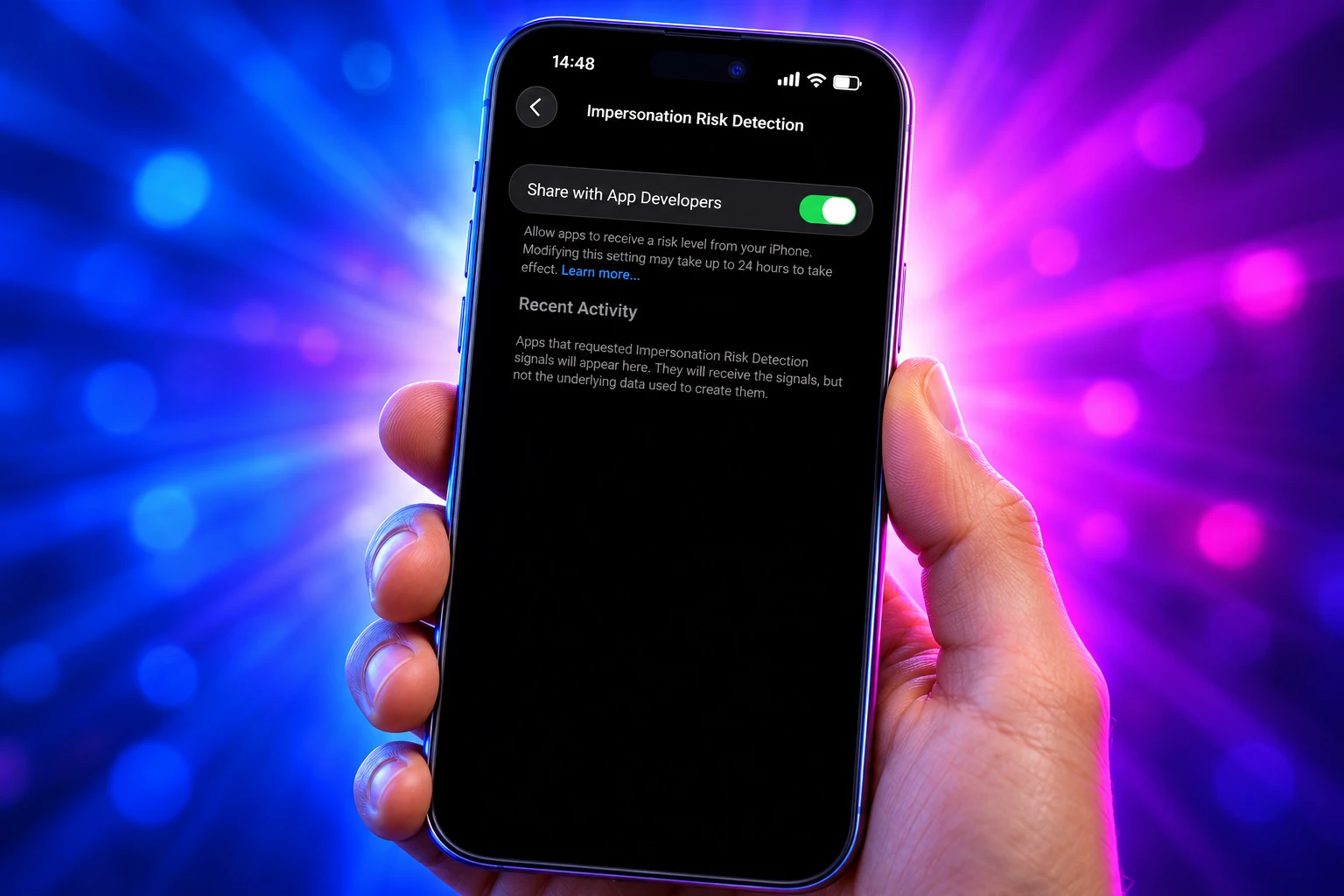
How Impersonation Risk Detection Works on iOS 27
The consumer name sits on top of Trust Insights, a developer framework Apple previewed at WWDC in June 2026. The documentation tells apps they can evaluate transactions for potential coercive activity without reading the contents of Photos, Messages, or Mail. A supported app asks for an insight when you try something that would hurt during a live scam, such as a payment or a password change. The insight Apple ships for this is a coaching check, returned as unknown, medium, or high.
Apple’s public support page uses the same three labels in plainer English. Unknown is the easy one to misread, and Apple says so.
THE THREE RISK LEVELS
| Level | What Apple says it found | What the iPhone does with it |
|---|---|---|
| Unknown | No evidence of suspicious activity was detected. That does not mean the action was confirmed as safe. | Nothing at the system level. The app decides. |
| Medium | Some signs of suspicious activity were detected. | Nothing at the system level. The app decides. |
| High | Significant signs of suspicious activity were detected. | Nothing at the system level. The app decides. |
A well-built app might add a delay, ask you to prove who you are again, or put a warning over the confirm button. A poorly built app can ignore the score. Apple’s own words are that it “doesn’t determine or control the action that the app takes.”
Developer notes describe five principal action areas the framework can score, including payments, account changes, and resource use. Apps need a Trust Insights entitlement in Xcode before they can ask. There is also a rate limit, so a client cannot spam the checker. None of that appears in Settings. The person being coached on a call never sees a model version, a category name, or a signed payload. They see whatever the app chooses to show, if it shows anything.
The feature is available starting with iOS 27 and iPadOS 27, and only inside apps that support it. Apple’s support document does not list macOS.
The 24-Hour Delay Before Anyone Can Switch It Off
Impersonation Risk Detection is off by default. That is the first filter. The second is the path: Settings, then Privacy & Security, then a toggle most people will never scroll to unless someone tells them it exists. The someone on a live scam call is the last person you want giving directions in that menu.
HOW TO TURN IT ON
- Open Settings: Use the Settings app on iPhone or iPad running iOS 27 or iPadOS 27.
- Privacy & Security: Scroll to Impersonation Risk Detection.
- Share with App Developers: Turn the toggle on. Apple says you might need to sign in to the App Store with your Apple Account.
Apple’s warning on that same page is the most honest line in the whole write-up. “If someone directs you to turn this feature off, you might be the victim of a scam.” Changes can take up to 24 hours to take effect, including when you shut the feature off for a single app. The delay is there so a caller cannot talk you through a disable-and-pay sequence in one sitting.
That delay is also why the toggle is a weak match for the crimes people picture first. A fake IRS voice asking for Apple gift cards never needs this menu. The new score runs when a supporting app requests it during a risky in-app action. A prepaid card read aloud on a call does not create that request. Hang up, then recognize and avoid social engineering scams through Apple’s own advice, rather than waiting for a badge that may never appear.
Once the feature is on, Recent Activity lists which apps asked for a score and why. You can cut access app by app. Those cuts can also wait up to 24 hours, so a panicked tap in the middle of a call does not take effect while the caller is still talking.
$1.6 Billion Lost to Impersonation Scams
The FBI’s Internet Crime Complaint Center restated the scale three days after Apple’s support page went up. Alert I-091726-PSA, dated September 17, 2026, says that from January 2025 to July 2026, IC3 took in nearly 61,000 complaints of law enforcement or government impersonation scams, with losses totaling more than $1.6 billion.
Scammers mainly call. They spoof real numbers and names, keep the target on the line, and tell them not to talk to family, a bank, or police. Payment is pushed onto prepaid cards, couriers, wires, cryptocurrency, or cash stuffed into a crypto kiosk. The bureau says artificial intelligence now helps the same crews look like officials on video.
IMPERSONATION LOSSES IN THE FBI ALERT
| Pretense described by IC3 | Complaints, Jan 2025 to July 2026 | Reported losses |
|---|---|---|
| Law enforcement or government impersonation, all types in the alert | Nearly 61,000 | More than $1.6 billion |
| Missed jury duty or a missed court date | 6,833 | Nearly $36 million |
| Expiring passport, driver’s license, or professional license | 496 | More than $348,000 |
| Medical license threats aimed at practitioners | 3,322 | More than $37 million |
| Foreign-official or embassy-style threats, including fake uniforms and mock offices | 1,809 | More than $140 million |
Those subtypes do not add up to the full complaint count. The bureau says the majority of cases still follow the older script: you are accused of a crime, then told to pay to make the charge disappear. A three-word score inside a bank app can interrupt the version of that script that ends in an in-app transfer. It cannot interrupt the version that ends at a kiosk.
Law enforcement and government authorities will never contact members of the public by telephone or text message to demand any form of payment or to request personal or sensitive information.
FBI Internet Crime Complaint Center, alert I-091726-PSA, September 17, 2026
Banks Already Slow Payments During Live Calls
Payment apps did not wait for iOS 27 to notice that a live call plus a transfer is a bad pair. Several already treat an in-progress call or a screen-share session as a reason to warn, blur, or block. Apple’s new score is an extra input for those apps, not the first one.
BRAKES BANKS SHIPPED BEFORE THIS TOGGLE
- Screen-share blur: Santander UK’s OneApp, on iOS 18 and later, blurs the banking screen when remote-access software is detected and blocks account actions until the session ends.
- Call-in-progress notices: Some UK banks already put a message on the home or payment screen stating they are not on the phone with you, so a caller claiming to be fraud control has to talk past the bank’s own text.
- Hard shutdowns: Fraud vendors sell a harsher mode in which a banking app closes itself while a call is connected, which stops a coached login before a score is even requested.
Those tools fire on a fact the phone already knows: you are on a call, or something is mirroring the display. Trust Insights is trying to infer coaching from patterns, timing, context, and basic sensor data, then mix that with Apple Account history. It can, in theory, catch a quiet scam that never trips a call detector. It can also stay silent in a loud one if the app never asks, or if you never enabled sharing.
Large banks that already spent years on their own fraud stacks have a reason to move slowly. They would be consuming a score they cannot audit, from a model Apple has not published, and they would still be the ones who have to explain a frozen payment to a customer who was not being scammed.
What Leaves the iPhone After You Opt In
The Settings copy leans on-device. Apple says it analyses interaction patterns, timing, context, and basic sensor data on the phone, never reads Photos, Messages, or Mail, and never hands those raw inputs to the requesting app. That part is narrower than the legal page sitting next to it.
Apple’s Impersonation Risk Detection privacy notice is more specific about the round trip. The device builds an on-device assessment from usage patterns, including whether you are currently sharing your screen and the approximate number of recent emails or calls. That assessment sent from your device to Apple is then combined with Apple Account activity such as recent App Store downloads and content purchases. Apple sends the resulting signal back to the app. The app is supposed to tell Apple whether it used the signal, or did not use it at all.
Apple says it will learn the category of in-app activity that triggered the request, such as a sign-in or a payment, and that it will not learn which app asked or the content of the in-app activity. It also lists, as data processed for legitimate interests, account details such as recent downloads, device type, software version, and device serial number, plus the kind of in-app action attempted. Retention, Apple says, lasts only as long as needed to provide and improve the feature.
So the raw sensor feed stays on the phone, and a derived assessment does not. That is a real privacy boundary. It is also a cloud feature with an on-device first step, which is a less tidy story than “the analysis never leaves.” WWDC materials described Trust Insights as combining device and cloud infrastructure, with the app integration kept on the client in Swift. Anyone who enabled the toggle on the promise that Apple would see nothing should read the legal page, not only the bullet in Settings.
No Public List of Supporting Apps
Turn the toggle on tomorrow and you still cannot tell, from Apple, whether your bank, wallet, or brokerage will ever request a score. There is no directory. Recent Activity stays empty until an app asks. Developer support has already heard the next complaint: after a user denies the prompt, there is no documented URL that opens Impersonation Risk Detection the way a notifications deep link reopens that pane. The recovery path is a manual walk through Settings.
WHAT WE KNOW
- The platforms: Apple lists iOS 27 and iPadOS 27, in apps that add support.
- The default: Share with App Developers is off until you turn it on.
- The delay: Changes, including per-app cuts, can take up to 24 hours.
- The output: Apps receive Unknown, Medium, or High, not the underlying data.
WHAT IS UNCONFIRMED
- Which apps: Apple has not published a roster of supporting titles.
- The scoring rules: The exact criteria for Medium versus High are not public.
- False positives: Apple has not said how a genuine emergency transfer is supposed to look to the model.
A week of how-to posts after the support page did not fill those gaps. Security people told users to enable the toggle anyway, which is fair as hygiene. It is still a seatbelt in a car the bank has not built. Voice scams that live entirely outside a supporting app, including classic gift-card runs, never generate a request, so they never generate a score.
Frequently Asked Questions
Does Apple Learn Which App Asked for the Score?
Apple’s privacy notice says it will not learn which app requested Impersonation Risk Detection signals, and it will not learn the content of the in-app activity. It will learn the category of that activity, such as a sign-in or a payment, and it will take feedback on whether the app used the signal.
Can a Bank App Open the Impersonation Risk Detection Setting for Me?
Apple’s public support steps are manual: Settings, Privacy & Security, Impersonation Risk Detection. On the Apple Developer Forums, developer support has treated a dedicated URL scheme, of the kind apps use for notification settings, as an enhancement request rather than a shipping method, so a denied prompt can strand a user without an in-app shortcut back to the toggle.
What Payment Methods Does the FBI Say Impersonators Demand?
The September 17, 2026 IC3 alert lists prepaid cards, couriers, bank wires, cryptocurrency, and cash inserted into cryptocurrency kiosks. The same alert says law enforcement and government officials will never request payment by prepaid card, cryptocurrency, or courier, and that you should verify a caller with official contact details you look up yourself, not with a number the caller provides.
What If I Already Denied Share With App Developers?
There is no second system prompt described in Apple’s user-facing steps. You go back to Settings, open Impersonation Risk Detection, and turn Share with App Developers on, which may require an App Store sign-in with your Apple Account. Give the change time to apply, because Apple says updates to the setting can take up to 24 hours.
Does Unknown Mean My Transfer Is Safe?
No. Apple’s support page says Unknown means no evidence of suspicious activity was detected, and that this does not mean the action was confirmed as safe. Developer materials for the coaching insight make the same point in different words: a lack of evidence is not a low-risk rating, and the app still has to decide what to do.
The toggle is still sitting off on a freshly updated iPhone. Until a supporting app asks for the score, and until that app treats High as something more than a log line, Impersonation Risk Detection is a setting that describes a defence the payment screen has not started using.

Edinburgh Opens a 2027 Tour Built for Time Trials

Korda Maps Auður From Meðalland to Irvine Bay

Apple Music Films Its New Logo in Mineral Oil

Oppo Prices the Pad Mini Above India’s iPad Mini

Austen Soaks Scotland Before Boelo Brings Weekend Gales

Volkswagen Sells the Osnabruck Plant to Clear a Board Fight

Apple’s Foldable iPhone Hinges on Samsung Display Supply

Saksham Gaur Finds He Is His Own Company’s Client

Tata Motors’ Iveco Tender Opens as Holders Still Decide

Onimusha Way of the Sword Preload Hits a Windows 11 Wall
-
 AUTO2 months ago
Volkswagen Sells the Osnabruck Plant to Clear a Board Fight
-
 NEWS2 months ago
Apple’s Foldable iPhone Hinges on Samsung Display Supply
-
 AUTO2 months ago
Tata Motors’ Iveco Tender Opens as Holders Still Decide
-
 BUSINESS2 months ago
Saksham Gaur Finds He Is His Own Company’s Client
-
 GAMING2 months ago
Onimusha Way of the Sword Preload Hits a Windows 11 Wall
-

 ENTERTAINMENT3 years ago
What is SD on Amazon Prime? – All You Need to Know
-

 BUSINESS2 months ago
Hyderabad 22-Carat Gold Jumps After a False Bargain
-

 NEWS2 months ago
iQOO 16 Locks 8,400 mAh While 100W Charging Holds