
NEWS
Apple Puts Kids’ Safari Behind a Parent in iOS 27
Apple’s September 24 video sells calm iOS 27 child tools, but Ask to Browse and a Family Sharing lock turn kids’ web into a parent ticket.

Apple posted a 2-minute 18-second child-safety video on September 24, 10 days after iOS 27 shipped. The clip walks parents through Ask to Browse, Ask to Buy, Time Allowances, and expanded Communication Safety on iPhone, iPad, and Mac.
The marketing is calm and animated. The software is a gate. A Child Account under 13 now needs a parent yes for new Safari sites, and the new Screen Time tools stay locked until every device in the Family Sharing group is on version 27.
The YouTube Clip Parents Were Meant to See
Apple published the film on its official YouTube channel under the title “New Apple child safety features help parents keep kids safe online.” It treats the Child Account as the start of the whole stack, not a buried Screen Time toggle. The tone is playful. A parent in the clip knocks back “that game they really, really want with the exploding brains,” then hedges on social media until the child is older.
The features themselves were already live. Apple said the new child safety features now available arrived with iOS 27, iPadOS 27, and macOS 27 on September 14, after a June 8 preview. The September 24 video is an awareness push, aimed at households that updated the child’s phone and never opened Family settings.
That gap is the point of the film. The controls only fire if a Child Account exists, the family organizer has updated parental controls for the group, and a parent sits in the child’s contacts list so approval requests have somewhere to go.
Ask to Browse Puts Safari on a Parent Ticket
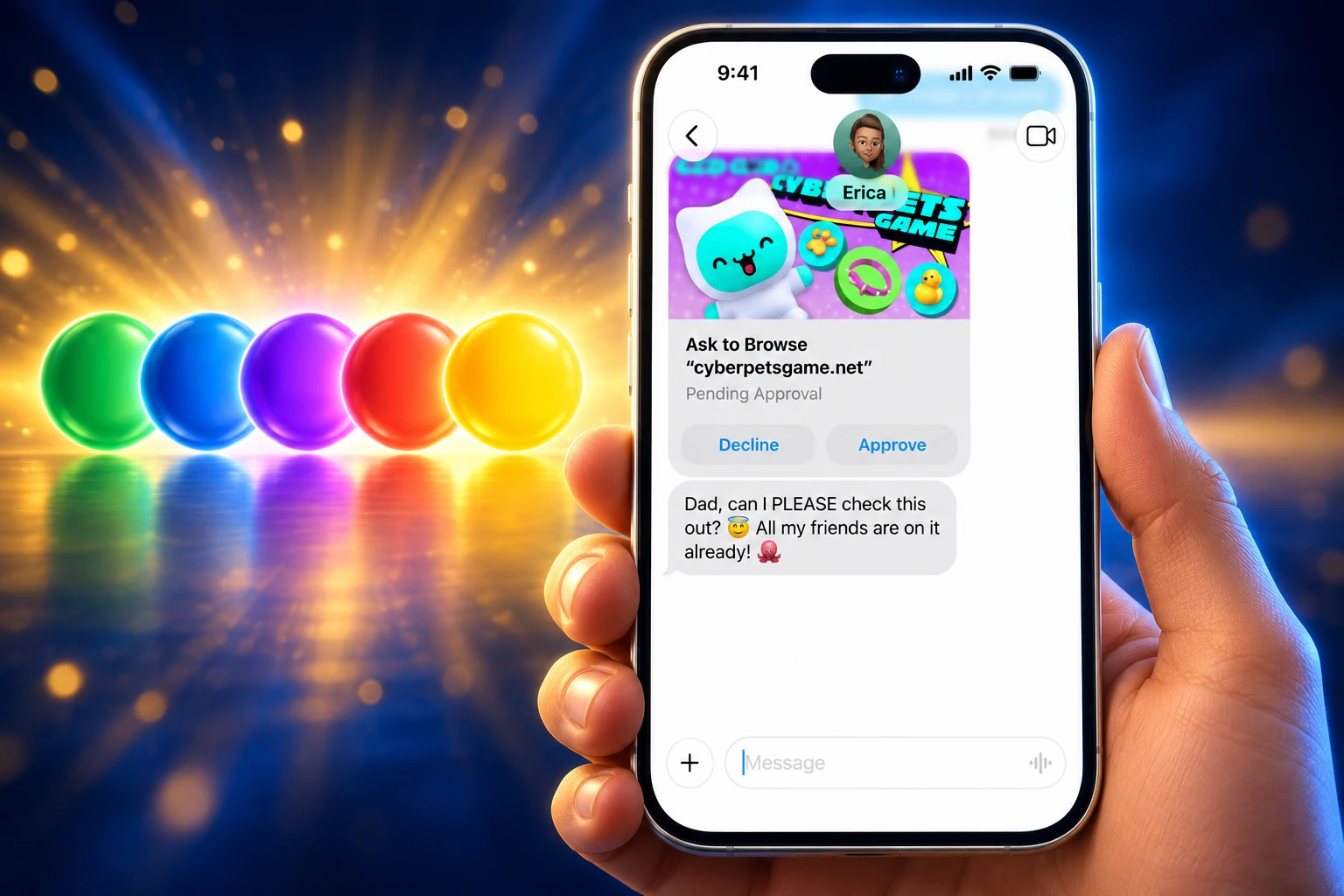
Ask to Browse is the new piece. When it is on, a child who tries to open a site that is not already approved has to send a request. The parent can accept or refuse from their own iPhone, iPad, or Mac, or enter the Screen Time passcode on the child’s device. Apple Support says the tool runs in Safari and other supported browser apps, not only the built-in browser. On watchOS 27 and visionOS 27, the system shows approved sites only.
Ask to Buy already sat in front of the App Store. Ask to Browse copies that model onto URLs. Kids have long opened the mobile web when a social app was blocked. The new control closes that path, one hostname at a time, and the parent sees the request in Messages.
THE DEFAULT GATES ON A CHILD ACCOUNT
| Control | Default | What it stops until a parent acts |
|---|---|---|
| Ask to Browse | On under 13 | New sites in Safari and other supported browsers |
| Ask to Buy | On under 13; in some regions on under 18 and cannot be switched off | App Store downloads and in-app purchases |
| Limit Adult Websites | On under 18 | Known adult web content |
| Communication Safety | On under 18 | Detected nudity, gore, or violence in images and video, including live FaceTime |
| New contacts | Parent-set | Unknown people in Messages, FaceTime, and Phone |
Parents can also allow sites ahead of time, which is the homework valve. A school portal or project page can sit on the approved list so the child is not stuck sending tickets during class. If a parent later blocks a site or an app, the app stays on the Home Screen but goes dim.
In some states, countries, or regions, Screen Time, Ask to Buy, Ask to Browse, and app content limits cannot be turned off for accounts under 18. Apple’s own support note flags that legal overlay. The same Child Account is a family product in one place and a compliance setting in another.
Start With Essential Apps, Then Add More
A Child Account is required for children under 13, or the local minimum age, and is available up to 18. Setup Assistant now asks the parent to choose the first Home Screen instead of handing over a full adult phone. Apple’s child-safety pages describe three starting points.
THREE WAYS TO START A CHILD’S HOME SCREEN
- Essential apps: A short set of system apps, enough to call, message, and get around, with everything else held back.
- Recommended set: A broader starter pack Apple considers age-appropriate, still short of a full adult layout.
- Custom list: The parent ticks the exact apps they want, then adds more later through Ask to Buy.
Time Allowances sit on top of that list. Parents set a daily budget across Entertainment, Games, and Social Media, then trim any one category. Apple feeds age-based starting points drawn from clinical and child-development research, and the parent can move the sliders. Schedules split weekdays from weekends, so school hours and Saturday mornings are not the same rule. A parent can pause a device at dinner with one tap, or grant extra time so a child can finish a chat.
Sumbul Desai, M.D., Apple’s vice president of Health and Fitness, framed the June preview around that tailoring, not a single lock.
At Apple, our mission has always been to create technology that empowers people and enriches their lives, while helping keep them safe. Our approach to helping families create safer digital experiences is grounded in the belief that every child is unique. That’s why we build simple and intuitive tools, based on expert guidance, to let parents tailor their kids’ digital journey.
Sumbul Desai, M.D., Apple vice president of Health and Fitness, June 8 newsroom statement
Apple is working with the American Academy of Pediatrics to adapt the AAP Family Media Plan into a guide parents can open while they use Apple products. The academy first published that plan in 2016. Its public pages still walk families through how to make a Family Media Plan that covers screen-free meals, sleep, and quality of content, not only minutes.
App makers get a quieter job. The Declared Age Range API lets a parent share a band of ages with an app, without handing over a birthday. PermissionKit can route in-app contact requests back to the same parent queue. The Child Account is no longer only a Screen Time profile. It is an identity other apps are being told to respect.
One Old Device Can Freeze the New Controls
The video never dwells on the boring rule that decides whether any of this appears. Apple Support is blunt: every device in the Family Sharing group must be on iOS 27, iPadOS 27, macOS 27, watchOS 27, and visionOS 27, and the organizer then has to update parental controls for the group. A house with a leftover Mac, an older Watch, or a Vision Pro on last year’s software does not get the new Screen Time.
THE SOFTWARE GATE BEFORE ANY PARENT TICKET
- Five system versions: iPhone, iPad, Mac, Apple Watch, and Vision Pro in the group all need version 27.
- Organizer step: The Family Sharing organizer or a parent has to update parental controls after those installs.
- Fallback: If a device cannot move, the family can keep the previous Screen Time tools or change limits on the child’s device itself.
- Group size: Family Sharing covers you and up to five other people, who share services without sharing one Apple Account.
Updating only the child’s iPhone is not enough. The new queue is a group feature, so one lagging machine holds the rest of the house on the old dials. That is why the September 24 clip exists. The code shipped on September 14. The install graph in a real family is messier than a two-minute cartoon.
Parents who want the new tools can set up parental controls on a child’s iPhone from their own device once that group is current. They also need to sit in the child’s contacts, or the Ask to Browse and Ask to Buy messages have no parent to reach.
Communication Safety Adds Gore Checks to Live Video
Ask to Browse is a gate in front of a URL. Communication Safety is a blur after a file arrives. For child accounts, the system already warned on detected nudity in Messages and FaceTime. In iOS 27 it also steps in when it detects gore or violence in shared images and videos, including live FaceTime calls. Children under 13 with a Screen Time passcode set cannot view the flagged material unless a parent enters that code.
Apple still runs this on the device. It does not send the photo to Apple, and it is not the CSAM hash scan the company floated and then dropped. The September 24 video folds the blur into the same Child Account story as website tickets and dinner-time pauses, which hides a long, awkward history.
FROM PHOTO SCANNING TO A PARENT QUEUE
- 2016: The American Academy of Pediatrics launches its Family Media Plan, built around household rules rather than a single time cap.
- August 5, 2021: Apple announces Communication Safety in Messages and a separate plan to match iCloud Photos against known CSAM hashes.
- December 13, 2021: Communication Safety ships in iOS 15.2 as an on-device nudity warning for Family Sharing child accounts.
- December 2022: Apple confirms it will not ship the iCloud Photos CSAM scan.
- June 8, 2026: Apple previews Ask to Browse, Time Allowances, and a rebuilt Screen Time on the same day UK ministers demand device-level nude-image blocks.
- September 14, 2026: The new tools ship in iOS 27, iPadOS 27, and macOS 27, with gore and violence added to Communication Safety.
- September 24, 2026: Apple posts the parent explainer on YouTube.
The through-line is parental control, not server-side scanning. After 2022, Apple put more weight on Family Sharing, on-device classifiers, and now a URL ticket in Safari. That is safer politically for a company that sells encryption. It also means a child without a correctly aged Child Account, or a family that never updates the Mac, never sees the new stack.
Why the UK Still Wants a Camera Block
June 8 did double duty. In Cupertino, Apple previewed Child Accounts and Ask to Browse. In London, then prime minister Keir Starmer told firms at London Tech Week to stop children taking, sending, or viewing sexually explicit images on phones and tablets, and gave them three months. “This is not an impossible challenge. These are some of the most innovative companies in the world and I believe they can solve it,” Starmer said. He added that if they did not, the government would change the law.
That three-month clock ran to September 8. iOS 27’s child tools went live six days later. They are not the same demand. Communication Safety can blur a nude or a gory clip in Messages and FaceTime. Ask to Browse can keep a child off a porn site in Safari. Neither stops the Camera app from taking a photo. Starmer asked for a device that cannot capture or show that image unless the user is verified as an adult.
WHAT WE KNOW
- The date: Starmer set a three-month mark on June 8, which landed on September 8.
- Apple’s ship: iOS 27 expanded Communication Safety and added Ask to Browse on September 14 for families that update.
- The verdict in London: UK culture secretary Lisa Nandy told lawmakers the companies’ proposals do not meet the scale of this crisis.
WHAT IS UNCONFIRMED
- The statute: When a UK bill would pass, and whether it would cover every existing phone or only new ones.
- The camera: Whether Apple will ever block capture of nude images on Child Accounts, which iOS 27 does not do.
- The penalty: How far fines or criminal liability for executives would go if firms refuse.
Nandy said the government intends to require Apple and Google to prevent nude images from appearing on devices used by children. That fight is still open. The September 24 video does not mention it. It sells a family product: age-based accounts, a parent in Messages, category clocks, and a Safari yes/no. For a household that wanted exactly that, the tools are in the software now. For a minister who wanted the shutter itself gated, the cartoon is beside the point.
The second-order change is already on the child’s phone. New sites, new apps, and new people become tickets. The catch is ordinary and un-cinematic: one Watch or Mac left behind, and the queue never turns on.
Frequently Asked Questions
What Is Ask to Browse in iOS 27?
Ask to Browse is a Screen Time filter set to Approved Websites Only, so a child must request any hostname that is not already on the allowed list. Parents can pre-approve a school site so homework does not wait on a text, and they can later move that site to the blocked list without deleting Safari.
Do All Family Sharing Devices Need Version 27?
Yes for the new Screen Time. If a Watch, Mac, or Vision Pro cannot update, Apple says the family can keep the previous parental controls or change limits directly on the child’s device, which is the escape hatch the YouTube clip skips.
Is Ask to Browse On by Default?
It is on by default for children under 13. Limit Adult Websites is the separate default for children under 18, and it filters known adult sites without turning every new URL into a permission request.
Does Ask to Browse Work Outside Safari?
Apple Support says it works in Safari and other supported browser apps after the Screen Time update on iOS 27, iPadOS 27, and macOS 27. It does not name third-party browsers, and on watchOS and visionOS the system only displays sites that are already approved.
What if a Child Account Has the Wrong Birth Date?
Apple’s child-safety pages warn that a wrong date of birth can leave age-based safeguards off. A parent can correct it in Settings or at account.apple.com, which is also where a child using someone else’s Apple Account should be signed out and moved onto their own Child Account.

Edinburgh Opens a 2027 Tour Built for Time Trials

Korda Maps Auður From Meðalland to Irvine Bay

Apple Music Films Its New Logo in Mineral Oil

Oppo Prices the Pad Mini Above India’s iPad Mini

Austen Soaks Scotland Before Boelo Brings Weekend Gales

Volkswagen Sells the Osnabruck Plant to Clear a Board Fight

Apple’s Foldable iPhone Hinges on Samsung Display Supply

Saksham Gaur Finds He Is His Own Company’s Client

Tata Motors’ Iveco Tender Opens as Holders Still Decide

Onimusha Way of the Sword Preload Hits a Windows 11 Wall
-
 AUTO2 months ago
Volkswagen Sells the Osnabruck Plant to Clear a Board Fight
-
 NEWS2 months ago
Apple’s Foldable iPhone Hinges on Samsung Display Supply
-
 AUTO2 months ago
Tata Motors’ Iveco Tender Opens as Holders Still Decide
-
 BUSINESS2 months ago
Saksham Gaur Finds He Is His Own Company’s Client
-
 GAMING2 months ago
Onimusha Way of the Sword Preload Hits a Windows 11 Wall
-

 ENTERTAINMENT3 years ago
What is SD on Amazon Prime? – All You Need to Know
-

 BUSINESS2 months ago
Hyderabad 22-Carat Gold Jumps After a False Bargain
-

 NEWS2 months ago
iQOO 16 Locks 8,400 mAh While 100W Charging Holds