
NEWS
Google Messages Trims RCS Voice Notes to a Single Tap
Google Messages is testing one-tap RCS voice notes to match WhatsApp, even as the faster start raises misfires and the inbox gets a wider restyle.

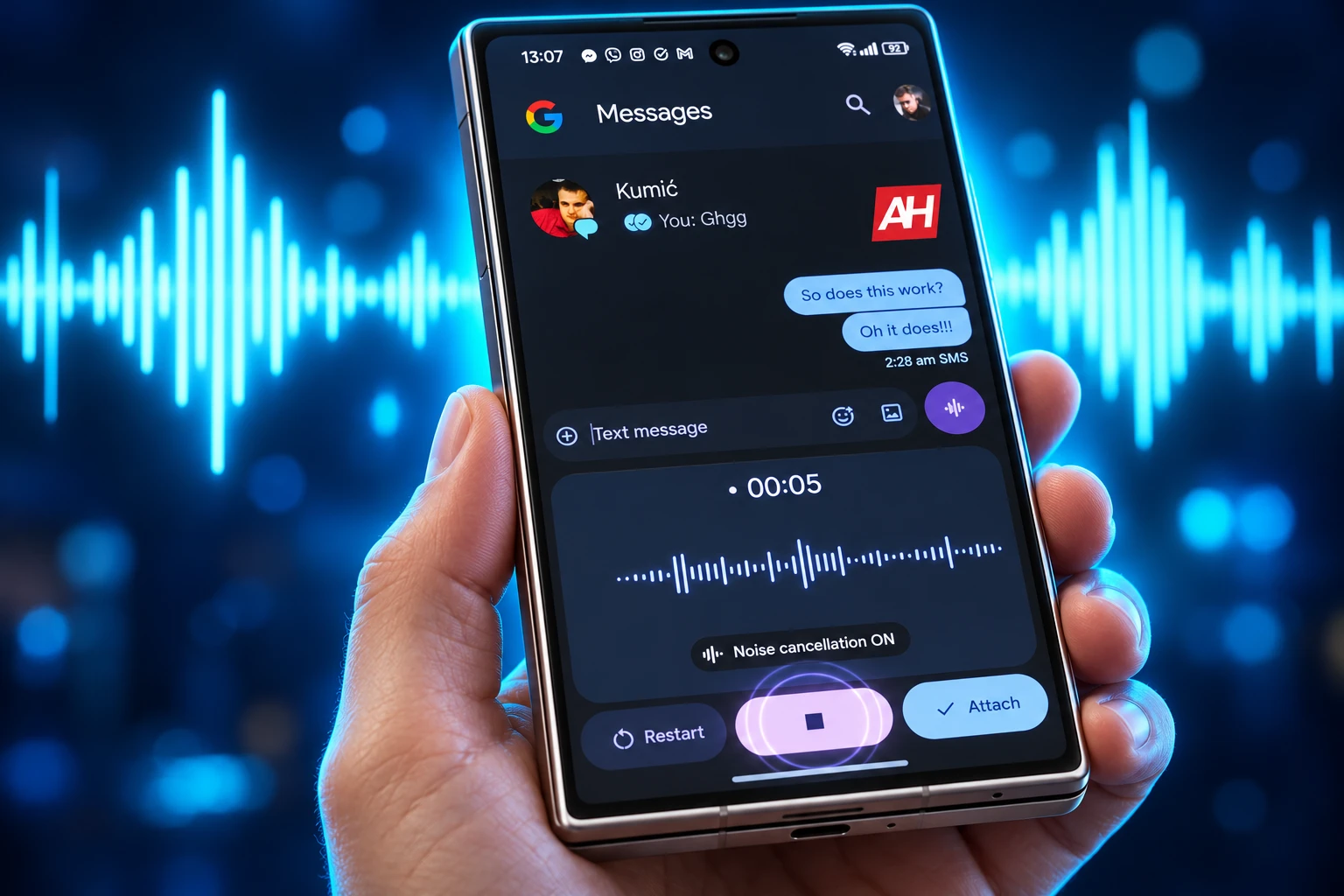
Google Messages is testing a one tap start for RCS voice notes in beta build messages.android_20260921_01_RC00. The flag showed up on September 28, 2026, and Google has not said if it will reach the stable app.
The same day’s code also restyles pinned chats with thumbnails, play buttons, and moving avatars. The mic shortcut is the headline; the inbox work is the larger shift, from an SMS list toward a full chat client.
The Extra Tap Is What Google Is Cutting
In the live app, a voice note in an RCS chat is a two-step job. You tap the waveform icon beside the compose box, then you hit a large microphone on a follow-up screen. You can skip that screen by long-pressing the waveform instead.
The extra screen is not decoration. It is a fallback for a tap on the waveform you did not mean to make. The work-in-progress demo in the September 21 beta starts recording on a single tap and leaves that guard out of the path.
Google’s own help article still tells people to press and hold Mic, then tap Send, which already lags the waveform panel in the current app. Some media steps on that page only apply on Android 6.0 and up. Photos or recordings you take inside Messages are not saved on the device.
HOW RECORDING STARTS
| App or build | How a voice note starts | Guard against a misfire |
|---|---|---|
| Google Messages now | Tap the waveform, then the large mic, or long-press the waveform | A second screen after the first tap |
| Google Messages beta | One tap | None described in the WIP demo |
| WhatsApp on Android | One tap | None described |
| Telegram | Long-press | You have to keep holding |
The change is in limited beta testing on RCS chats only. It is not a public rollout, and the code can still be pulled before anyone on the stable channel sees it.
WhatsApp Already Starts a Voice Note This Way
WhatsApp on Android already lets a chat start a voice note with a single tap. Telegram still makes you long-press a dedicated button. Google Messages is lining up with the WhatsApp pattern, not inventing a new one.
That is the habit RCS has to match if the default Android app is going to feel like the apps people already use for audio. Google’s product pages now sell chats with iPhone contacts the same way, with high-quality media, typing indicators, and read receipts once RCS is on at both ends.
Voice has been a Messages project for years, not a one-week experiment. The recorder already gained a tap-to-open panel, noise cancellation, and Voice Moods, the animated emoji backgrounds Made by Google was still pushing on May 14, 2026. The new work does not add a mood or a filter. It only shortens the path into that recorder.
Accidental Recordings Come With the Faster Start
The louder problem is a tap that starts recording when you meant to type. The waveform sits next to the text field, which is the same corner of the screen people hit when they want the keyboard, an attachment, or Gboard’s own mic.
The current two-step flow exists because that corner is easy to clip. Take the fallback screen away and a grazing tap can open a live recorder, chew battery, and leave an audio clip sitting on the send bar. Long-press, the Telegram-style hold, is slower and harder to fire by mistake.
A settings toggle for single-tap recording would split the difference, keeping the short path for people who send audio all day and leaving the safety screen for everyone else. Nothing in the beta write-up shows that switch. Until it exists, the faster start is a gift to frequent senders and a trap for the rest.
Pinned Chats Gain Thumbnails and Moving Avatars
The voice flag did not land alone. A separate pass through the same week’s Messages code shows pinned chats being rebuilt as a glanceable strip at the top of the inbox, closer to a story row than a small pin badge on a text list.
Right now a pinned contact who is writing simply shows the word “typing.” The work-in-progress version replaces that label with an animated contact picture, using Material 3 Expressive motion so the face itself is the indicator. You see who is mid-reply without opening the thread.
Media in that strip is equally thin today. A pinned chat that just received a picture or a clip only says “Image” or “Video.” The new layout puts the file in the row.
WHAT THE PIN ROW WOULD SHOW
- Photos: A thumbnail of the image the contact sent, visible before you open the chat.
- Videos: A frame from the clip with a play button; the tap still opens the thread to watch and reply.
- Audio: A waveform with a play button, so a voice note is obvious in the list.
- GIFs: An animated preview instead of a generic file label.
- Files: Icons for PDFs and contact cards, plus a generic mark for types the app does not preview.
The same work would let you pin or unpin several chats at once. Today the pin icon disappears when you select more than one contact. This is not live. It is unfinished code that had to be forced on for screenshots, and it can still change shape or vanish.
How Do You Send a Voice Note in Google Messages?
You still need an RCS chat for the rich audio path. Open Google Messages, open or start a conversation, and use the waveform or mic control in the compose bar. In the current app that is tap-then-mic or a long-press on the waveform. Google’s help article still describes a press-and-hold on Mic, then Send.
To cancel, swipe left on the chat or close the message. If RCS is off, the thread falls back toward SMS or MMS and the fancy recorder is not the point of the new beta flag. Android users can turn on RCS chats in Messages settings when the carrier and the other phone support it.
The one-tap experiment does not change how a finished clip is sent, stored, or played. It only changes how recording begins. HD and HD+ still apply to photos and videos you attach, not to this audio shortcut, and camera effects remain limited to Pixel 6 and later plus Samsung Galaxy S20+ devices.
September’s Other Messages Changes Point the Same Way
Look at the rest of September 2026 and the voice shortcut sits in a pile of inbox work, some of it already reaching phones, some of it still buried in betas. The direction is consistent: Messages should behave like a modern chat app, not like a carrier SMS tray with extra buttons.
THE SEPTEMBER BUILD PILE
- September 16, 2026: A Google Keep shortcut lands in chats as part of the September Android Drop, so a shared note can start inside the thread.
- September 25, 2026: Build 20260910_03_RC02 rolls a floating long-press menu, a left swipe that reveals timestamps and RCS encryption status, and a right swipe on a bubble to reply.
- September 28, 2026: Pinned chats pick up thumbnail previews and animated typing faces in unfinished code.
- September 28, 2026: The same day’s beta, messages.android_20260921_01_RC00, tests one-tap voice recording in RCS chats.
That stack only matters because RCS is no longer a side protocol. Erik Kay, VP of Engineering for Android Core Platform, put a volume on it in May.
With 2.5 billion RCS messages sent daily, based on the average from the past 28 days, secure communication is more important than ever.
Erik Kay, VP of Engineering for Android Core Platform, Google blog, May 12, 2026
The same week in May, Google and Apple began rolling out end-to-end encrypted RCS messaging in beta for iPhone users on iOS 26.5 with supported carriers, and for Android users on the latest Google Messages. Google Messages users see the same lock icon they already know from Android-to-Android RCS. Encryption is on by default and fills in over time for new and existing RCS threads.
Once those chats carry encryption, typing indicators, and high-quality files, the remaining gaps are tactile. A two-step voice note is one of them. A pin row that only says “Video” is another. Google is sanding both in the same month, which is why a small recorder flag is sitting next to a rebuild of the home screen.
Kay’s figure of 2.5 billion RCS messages is a 28-day average from that May post, not a new count tied to the September beta. It still explains the urgency: the default app is now the pipe for a lot of daily traffic, including threads that cross to iPhone.
Google Has Not Named a Ship Date
There is no public timetable for one-tap recording, for the pin previews, or for making either one the default. Google often parks ideas in beta builds for weeks or months, then ships a slice, reworks it, or leaves it in the APK. The teardown note on the pin work is blunt about that: predicted features from unfinished code may never reach a public release.
WHAT WE KNOW
- The beta: One-tap voice start is in messages.android_20260921_01_RC00, spotted on September 28, 2026, and limited to RCS chats.
- The live path: Recording still takes a waveform tap plus a large mic, or a long-press on the waveform.
- The pin work: Animated avatars, media thumbnails, and multi pin-unpin are in the same week’s code and are not on for normal users.
- The docs: Google’s help article still describes press-and-hold on Mic and a left swipe to cancel.
WHAT IS UNCONFIRMED
- Default behavior: Whether one-tap becomes the standard start or stays behind a flag.
- A toggle: Whether Messages will let you keep the safety screen.
- The pin strip: Final layout, how many chats sit in that row, and whether the animated face ships at all.
- Timing: Any stable-channel date for the recorder or the inbox restyle.
Until Google flips a server flag, the practical advice is unchanged. Send voice notes the way the app works on your phone today, watch for a recorder that starts on first contact, and treat every September teardown as a sketch. The sketch is coherent: fewer taps to talk, more of the chat visible before you open it, and an SMS app that no longer behaves like SMS.

Edinburgh Opens a 2027 Tour Built for Time Trials

Korda Maps Auður From Meðalland to Irvine Bay

Apple Music Films Its New Logo in Mineral Oil

Oppo Prices the Pad Mini Above India’s iPad Mini

Austen Soaks Scotland Before Boelo Brings Weekend Gales

Volkswagen Sells the Osnabruck Plant to Clear a Board Fight

Apple’s Foldable iPhone Hinges on Samsung Display Supply

Saksham Gaur Finds He Is His Own Company’s Client

Tata Motors’ Iveco Tender Opens as Holders Still Decide

Onimusha Way of the Sword Preload Hits a Windows 11 Wall
-
 AUTO2 months ago
Volkswagen Sells the Osnabruck Plant to Clear a Board Fight
-
 NEWS2 months ago
Apple’s Foldable iPhone Hinges on Samsung Display Supply
-
 AUTO2 months ago
Tata Motors’ Iveco Tender Opens as Holders Still Decide
-
 BUSINESS2 months ago
Saksham Gaur Finds He Is His Own Company’s Client
-
 GAMING2 months ago
Onimusha Way of the Sword Preload Hits a Windows 11 Wall
-

 ENTERTAINMENT3 years ago
What is SD on Amazon Prime? – All You Need to Know
-

 BUSINESS2 months ago
Hyderabad 22-Carat Gold Jumps After a False Bargain
-

 NEWS2 months ago
iQOO 16 Locks 8,400 mAh While 100W Charging Holds