
NEWS
Pixel VIPs 2.0 Ships Fullscreen While the Widget Stays Dark
Pixel VIPs 2.0 is on the Play Store with a fullscreen page and a pill switcher, but Google’s advertised one-tap home screen widget is still waiting on a server.

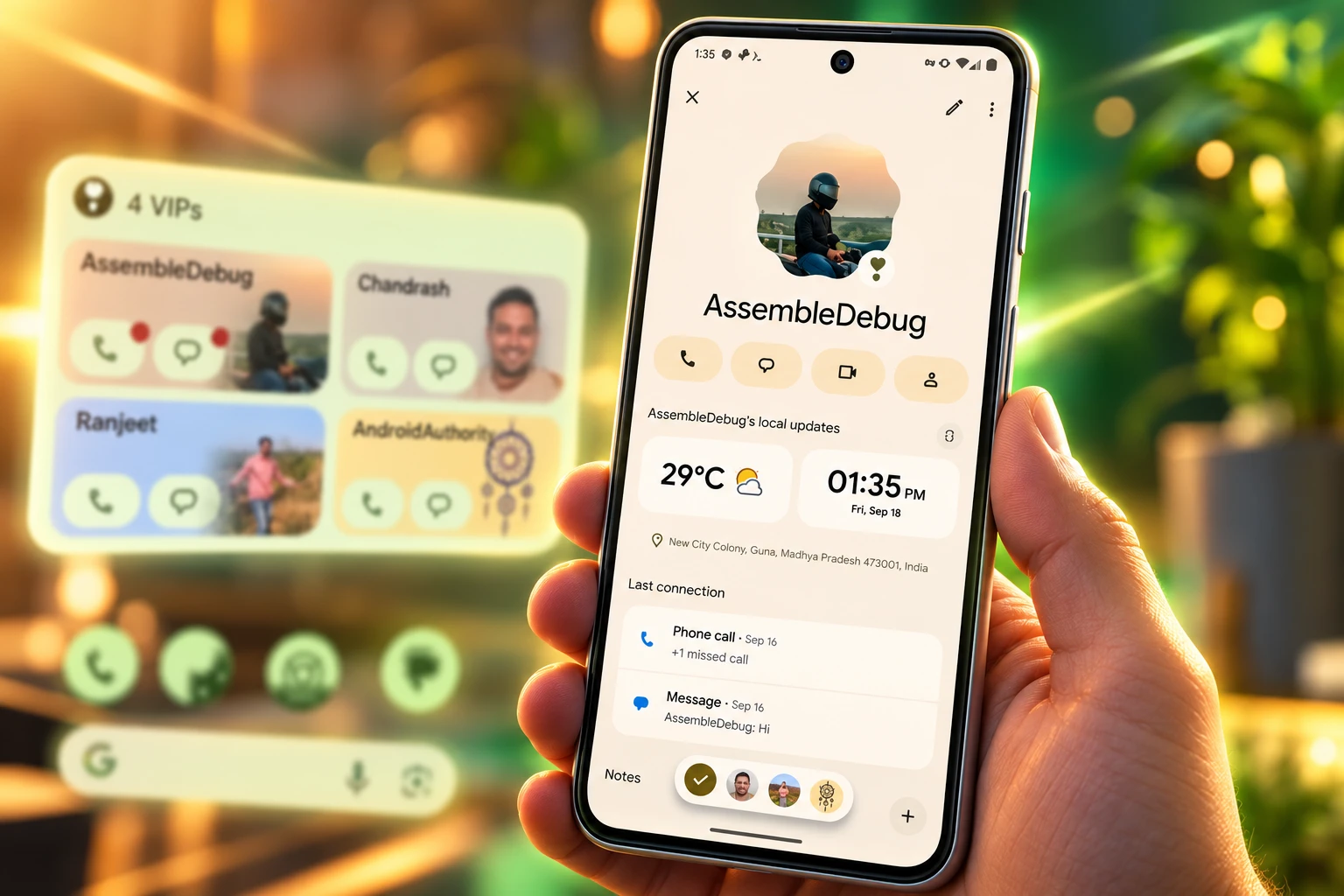
Pixel VIPs 2.0 is on the Play Store as of September 21, but the one-tap home screen widget Google advertised on September 15 is not live. Tapping a VIP now opens a fullscreen page instead of a sheet over the home screen, and a pill-shaped switcher lets you jump between people without backing out.
The page also loses the media and place cards that used to sit at the bottom. The old sheet kept call and message buttons near your thumb. The new layout does not.
Tapping a VIP Now Fills the Screen
On Pixel VIPs 2.0, a tap on a contact in the widget no longer slides up a bottom sheet. It opens the fullscreen VIP page that used to appear only if you swiped the sheet up. Call, message, video, and contact buttons switch to outline-style icons, and a pencil in the top-right corner jumps into Google Contacts for a quick edit.
Local updates, including weather and time, now sit above Last connection. Notes is the last block on the page. Testers who installed build 2.0.97 on September 18 also saw Material 3 Expressive styling on that page, including scalloped photo frames in place of plain circles.
The sheet was the whole trick in daily use. Half the home screen stayed visible, and the actions sat low enough to hit with one hand. Fullscreen looks more like an app. It also puts the things you actually press farther from the bottom edge on a tall Pixel.
The Widget Google Advertised Is Still Off
Google’s September 15 Pixel Drop post led with home screen widgets, not with a new contact page. The company said owners could call or text people with a single tap, swipe a floating overlay to switch VIPs, and see notification badges so unread messages are harder to miss. That copy is still the public pitch.
Hands-on checks on September 16 found the new widget code sitting in Google Contacts, waiting on a server-side switch. People who forced it on saw a full-width card with a row for quick actions. On September 21, after Pixel VIPs 2.0 had gone out through the Play Store, that card was still not on for a normal update. Google has not given a date for the flag.
WHAT WE KNOW
- The app: Pixel VIPs 2.0 was widely available through the Play Store on September 21.
- The page: Fullscreen VIP view, outline icons, pencil edit, and the pill switcher are in that build.
- The versions: The Drop notes point to Pixel VIPs 2.0 and Google Contacts 4.77 or later on Pixel 6 and newer.
WHAT IS UNCONFIRMED
- The widget flag: Google has not said when the redesigned home screen card will switch on for everyone.
- Badge timing: Glanceable notification badges were part of the Drop copy and have not been confirmed on a live public widget.
This is the same split Pixel VIPs had at birth. The Contacts menu and the hidden service often landed days apart, and owners waited on a flag then too. The difference is that Google put the widget in the Drop headline this time, then shipped the page first.
One-Tap Calls Stop After Four People
Even the previewed widget is not the one-tap launcher the Drop post describes for every setup. People who turned it on early found that quick call and text buttons appear only on a full-width card, and only if the VIP list stays at four people or fewer. Add a fifth and the card falls back to the older layout rather than packing buttons into the row.
WHERE THE NEW WIDGET KEEPS THE BUTTONS
| Home screen setup | Quick call and text | What the card does |
|---|---|---|
| Full width, four VIPs or fewer | Yes, once the server switch is on | Shows the new action row |
| Full width, more than four VIPs | No | Reverts to the older widget |
| Smaller than full width | No | Stays resizable, loses the buttons |
Google’s help page now says you can add up to 16 people as your Pixel VIPs. That is a different number from the widget’s four-person layout cut, and it is a different number from launch, when coverage of the June 2025 Drop described a cap of eight. The list can grow. The new home screen card cannot, at least in the previewed design.
There is a quieter change in how single-person widgets work. Dropping a one-contact Contacts widget on the home screen used to open that person’s details, with no VIP status attached. In the new behavior, adding that widget first puts the person on the VIP list, and a tap opens the VIP sheet instead of the old contact page. Anyone who used those shortcuts as plain speed dials is now feeding the VIP roster whether they meant to or not.
Google Dropped the Activity Cards
Pixel VIPs 2.0 also deletes the block that used to sell the feature as more than a fancy favorite list. Things to do together, the media and place recommendations at the bottom of a VIP page, is gone. Notes takes the last slot. Google’s own help article still talks about activity ideas, so the public docs have not caught up with the app.
HOW THE VIP PAGE IS STACKED IN 2.0
- Local updates: Weather, time, and location when it is shared now sit at the top.
- Last connection: Recent calls and messages, including WhatsApp, move down a slot.
- Notes: Memos land last, in the space the recommendation cards used to occupy.
- Removed: Movies, TV, places, and the other “do this together” suggestions no longer appear.
Those cards were never the part people opened the widget for. Early users said the suggestions did not feel personal even after they set categories such as movies, food, books, and sports. Google still lets you store those tastes on the device, and its help text still says it may use them for restaurant or book ideas. The 2.0 page just does not show the ideas.
What remains is closer to a well-dressed contact record: last chat, last call, local time, a memo field, and four outline buttons. That is useful. It is also a narrower product than the one Google launched with talk of shared plans and “things you like to do together.”
Why the Pill Switcher Matters on Tall Phones
The change that will actually get used, if the widget stays dark, is the pill at the bottom of the fullscreen page. It shows every VIP and lets you switch without returning to the home screen. You can swipe the strip, tap a photo, or long-press for arrows. Google’s Drop post called this a floating overlay navigation menu. Walkthroughs on September 21 called it a pill-shaped switcher. It is the same control.
Stay connected to your VIPs with updated home screen widgets that let you call or text people with a single tap, or switch between contacts using the bottom floating overlay navigation menu. New notification badges ensure you never miss a message.
Google, September Pixel Drop, September 15, 2026
On a tall phone, that strip is doing the job the old bottom sheet did: keep the next person within reach. It also makes the VIP page feel like the Contacts app Google has not been willing to ship. Replies to the first public demos of 2.0 kept landing on that point. The new page looks like ordinary Contacts, if ordinary Contacts had local weather, a last-message card, and a way to hop between eight or 16 people without hunting.
That is a compliment with a cost. If Pixel VIPs is now the nice Contacts surface, it is competing with the widget for attention, and the widget is the thing Google put in the Drop. Until the flag flips, owners who update are paying for a prettier full-screen record, not for the one-tap call the post described.
Pixel VIPs Began as a June 2025 Widget
Google introduced Pixel VIPs on June 10, 2025, in that month’s Pixel Drop, as a Contacts widget for Pixel phones. The pitch was a home screen card for the people you actually call: last message (including WhatsApp), upcoming birthdays, shared location, memos, and a Do Not Disturb exception. VIPs became Favorites, so they could bypass Do Not Disturb unless you turned that off.
THE PIXEL VIPS CLOCK
- June 10, 2025: Pixel VIPs ships with the June Pixel Drop as a resizable Contacts widget on Pixel 6 and newer, with a launch-era list of eight people.
- November 2025: VIP messages pick up prioritized notifications, with the contact’s avatar in the status bar, plus crisis badges on the widget.
- September 15, 2026: The September Pixel Drop promises one-tap call and text on the widget, notification badges, and a floating switcher, and names Pixel VIPs 2.0 plus Contacts 4.77+ as the vehicle.
- September 16, 2026: Hands-on previews show the new widget waiting on a server switch, with quick actions limited to a full-width card of four VIPs or fewer.
- September 18, 2026: Build 2.0.97 starts showing the fullscreen VIP page, the pill switcher, and the missing recommendation block.
- September 21, 2026: Pixel VIPs 2.0 is widely available on the Play Store; the redesigned widget is still not live after the update.
Fifteen months after launch, the feature is still a Pixel-only Contacts add-on, not a separate app with a launcher icon. Setup still lives under Organize in Google Contacts. The other person can be on iPhone or Android. Location still depends on Google Maps or Find Hub sharing, and WhatsApp still has to be updated for last-message cards to fill in.
Play Store Has 2.0, Not the New Widget
Anyone on a Pixel 6 or later, including Pixel Fold, can look for the update now. Google’s help page also tells you to keep Pixel Weather, WhatsApp, and Google Contacts current. The Drop coverage tied the redesign to Pixel VIPs 2.0 and Contacts 4.77 or later, in every region and language the feature already supports.
WHAT AN UPDATE ON SEPTEMBER 21 ACTUALLY GAVE YOU
- On the phone: Fullscreen VIP page, outline action icons, pencil edit, reordered cards, and the pill switcher.
- On the home screen: The existing widget, without the new one-tap row, until Google flips the switch.
- In the list: Room for 16 VIPs on paper, and a previewed widget that only keeps quick actions at four.
Install it if you want the page. Do not expect the Drop’s home screen shortcuts to appear with the same tap. Google already has the buttons in the build. It has not turned them on.
Until that flag moves, Pixel VIPs 2.0 is a fullscreen contact viewer with a better way to hop between people, and a thinner set of cards than the version that launched in June 2025. The widget Google put at the top of the September 15 post was still dark on September 21.

Edinburgh Opens a 2027 Tour Built for Time Trials

Korda Maps Auður From Meðalland to Irvine Bay

Apple Music Films Its New Logo in Mineral Oil

Oppo Prices the Pad Mini Above India’s iPad Mini

Austen Soaks Scotland Before Boelo Brings Weekend Gales

Volkswagen Sells the Osnabruck Plant to Clear a Board Fight

Apple’s Foldable iPhone Hinges on Samsung Display Supply

Saksham Gaur Finds He Is His Own Company’s Client

Tata Motors’ Iveco Tender Opens as Holders Still Decide

Onimusha Way of the Sword Preload Hits a Windows 11 Wall
-
 AUTO2 months ago
Volkswagen Sells the Osnabruck Plant to Clear a Board Fight
-
 NEWS2 months ago
Apple’s Foldable iPhone Hinges on Samsung Display Supply
-
 AUTO2 months ago
Tata Motors’ Iveco Tender Opens as Holders Still Decide
-
 BUSINESS2 months ago
Saksham Gaur Finds He Is His Own Company’s Client
-
 GAMING2 months ago
Onimusha Way of the Sword Preload Hits a Windows 11 Wall
-

 ENTERTAINMENT3 years ago
What is SD on Amazon Prime? – All You Need to Know
-

 BUSINESS2 months ago
Hyderabad 22-Carat Gold Jumps After a False Bargain
-

 NEWS2 months ago
iQOO 16 Locks 8,400 mAh While 100W Charging Holds