
NEWS
Apple Puts Cinema Camera Controls in Final Cut Camera
Final Cut Camera 2.4 is a free cinema-style control surface for iPhone 18 Pro, with SDI, genlock, and Cinematic edits inside Apple Creator Studio.

Apple shipped Final Cut Camera 2.4 on September 29, 2026, with variable aperture control for iPhone 18 Pro. The free filming app also adds cinema-set monitoring, clean SDI out through a converter, and genlock offset once iOS 27 is on the phone.
Apple Creator Studio’s other apps got templates, new Numbers functions, and Freeform tweaks on the same date. The camera build is the part that changes a shoot.
Final Cut Camera 2.4 Puts Cinema Controls on iPhone
Apple calls version 2.4 a ground-up redesign of the professional iPhone filming app it first released in 2024. The company said the new version is a free software update beginning September 29. That clashes with a circulating claim that the app now needs an Apple Creator Studio login. The newsroom note is the one that counts: the update itself is free.
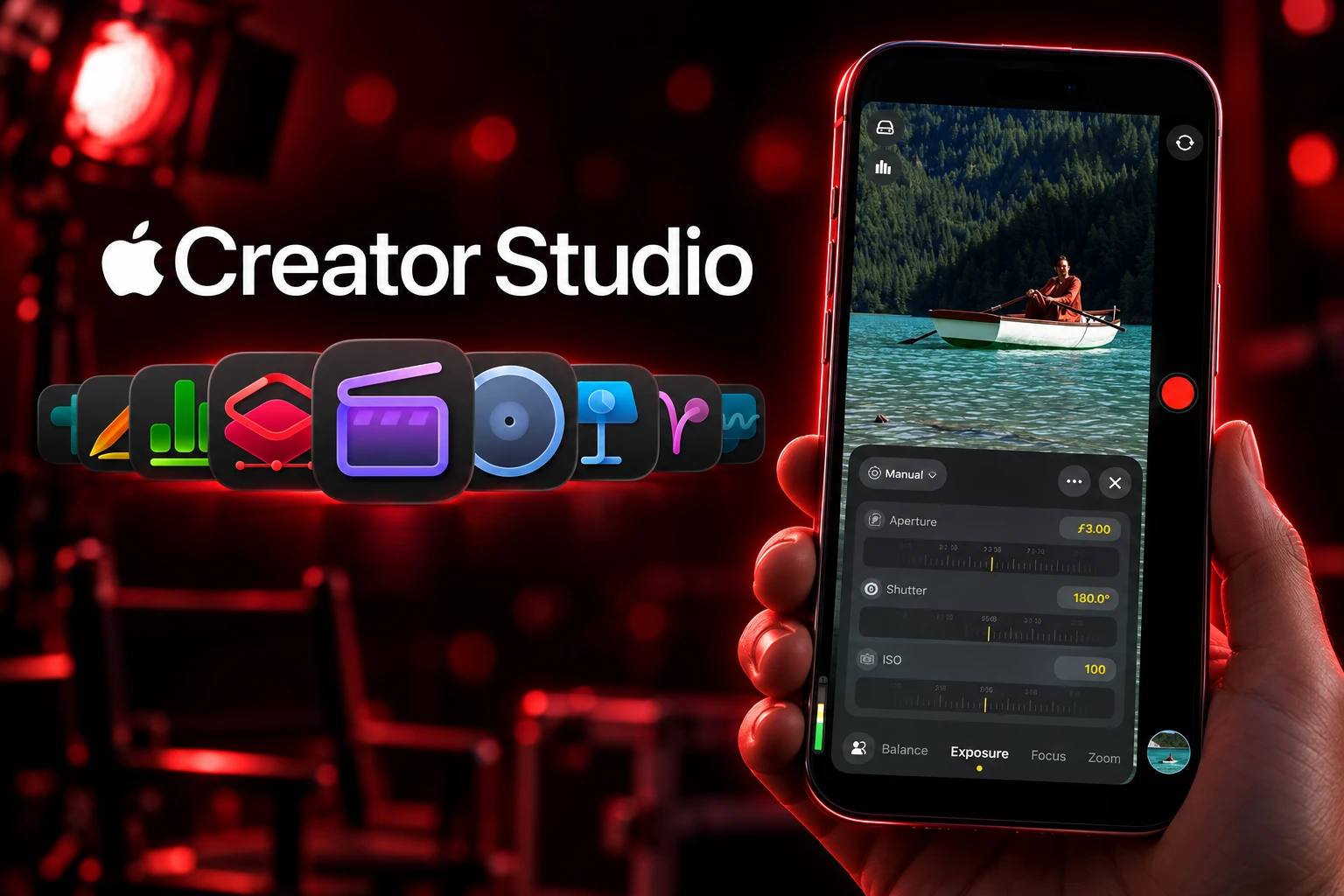
Shutter angle, ISO, and white balance sit closer to the operator’s thumb. Custom overlays include false color and clipping indicators for exposure. Focus peaking now has a sensitivity control. A tally light comes on while a clip is rolling. A two-finger tap clears the viewfinder so the frame is the only thing on screen.
Those are set-camera habits, not iPhone Camera-app habits. Operators who already live in Blackmagic’s free app will recognize the language. Apple is now speaking it in its own skin, then handing the files to Final Cut Pro.
THE 2.4 CONTROL SURFACE
- Exposure aids: False color and clipping indicators with threshold settings sit as customizable overlays.
- Focus aids: Improved focus peaking adds a sensitivity control for pulling by eye.
- On-set cues: A tally light marks recording, and a two-finger tap hides the chrome.
- Codecs on the notes: The 2.4 listing still offers ProRes 422 HQ, ProRes 422, and ProRes 422 LT, plus a switch to kill digital zoom so clips stay at full optical resolution.
Final Cut Camera’s original job was Live Multicam into Final Cut Pro for iPad, with several iPhones feeding one cut. That path remains. What changed is how much of a single camera the app now wants to be, even when no iPad is in the bag.
RGB Parade, Clean SDI, and a Tally Light
The features most write-ups bury are the ones that belong on a video village cart. With iOS 27, Final Cut Camera adds professional video scopes, clean SDI out, and genlock offset. Apple names two scopes: RGB Parade, which splits red, green, and blue so you can check color balance and exposure, and a histogram.
Clean SDI out is not a new BNC port on the phone. Apple said creators can send a clean video signal using an HDMI-to-SDI converter for broadcast-quality streaming. Genlock offset is the companion fix. The company said it compensates for image artifacts from a recorded display, or for latency differences between an iPhone and other genlocked cameras.
Hardware on iPhone 18 Pro already lists genlock support, ProRes RAW, Apple Log 2, and Academy Color Encoding System capture. Version 2.4 is the app catching that I/O and putting numbers on the glass.
WHAT 2.4 NEEDS TO RUN
| Feature | What Apple says you need |
|---|---|
| Variable aperture, aperture priority, shutter priority | iPhone 18 Pro or iPhone 18 Pro Max, Fusion Main camera |
| RGB Parade, histogram, clean SDI out, genlock offset | iOS 27 |
| Redesign, tally light, two-finger clear, false color, focus peaking | Final Cut Camera 2.4 on a supported iPhone |
| Cinematic mode effects in the Final Cut Pro timeline | Video shot on iPhone 18 Pro or iPhone 18 Pro Max, including ProRes and Apple Log |
The stock Camera app is not empty. Apple’s iPhone 18 Pro spec sheet already lists Pro controls for lens aperture, shutter speed, white balance, and a live histogram, plus Smart focus tracking that can lock a subject who leaves the frame and walks back in. Final Cut Camera still has to earn its slot against that. The 2.4 argument is shutter angle instead of shutter speed, false color, a tally, scopes, and a clean feed into a converter, not the mere existence of an f-stop control.
What Variable Aperture Unlocks on iPhone 18 Pro
Apple’s September 29 note says the 48MP Fusion Main camera with variable aperture is the most advanced camera it has ever made, and that the hardware brings aperture control to iPhone for the first time. Final Cut Camera lets you dial the setting, or pick shutter priority or aperture priority, instead of leaving the six-blade iris on automatic.
The stops are not a continuous ring. Specs list four values on the Fusion Main: ƒ/1.48, ƒ/1.8, ƒ/2.8, and ƒ/4.0. Apple describes six laser-cut blades driven by a rotor. Focal length on that module is 24/48 mm for 1x and 2x. Ultra Wide stays ƒ/2.2. Telephoto stays ƒ/2.8. If you came for a variable iris on every lens, you do not have one.
FOUR STOPS ON THE FUSION MAIN
- ƒ/1.48: Apple’s wide-open setting, claimed at around 50 percent better low-light performance for indoor scenes and faster Night mode stills.
- ƒ/1.8: The portrait default, which Apple calls the balance of light gathering and depth of field.
- ƒ/2.8: A middle stop for when ƒ/1.8 is too thin and ƒ/4.0 is too dark.
- ƒ/4.0: The narrow setting Apple says keeps more of a group in focus when there is enough light.
That is a real optical change, and it is also the oldest control in photography. Aperture priority, shutter priority, and full manual in Final Cut Camera are how a DP would expect to hold those four stops. They do not turn a phone into a PL-mount body. They stop the computational stack from hiding the iris.
After the Shoot, Depth of Field Still Moves
The other 18 Pro-only trick is Cinematic mode as a grade, not a capture mode. Apple said 2.4 unlocks Cinematic mode effects for regular video, including footage captured in ProRes and Apple Log, so focus points and depth of field can be adjusted in Final Cut Pro. Final Cut Pro and Motion on Mac both pick that up. You shoot a normal clip, then slide focus later on the timeline.
With clean SDI out, creators can send a clean video signal using an HDMI-to-SDI converter for broadcast-quality streaming. And with genlock offset, creators can compensate for image artifacts from a recorded display or for latency differences between their iPhone and other genlocked cameras.
Apple, Final Cut Camera 2.4 newsroom update, September 29, 2026
Compressor, the Mac encoder in the same family, can convert video that carries those Cinematic mode effects back into the previous Cinematic mode format. It also gains new HEVC and MPEG-4 export presets. Capture, grade, and deliver stay inside Apple’s apps if you want them to.
That round trip is where a free camera app meets a paid editor. Final Cut Camera does not require Apple Creator Studio. Final Cut Pro, Motion, and Compressor do, unless you already bought the Mac versions as one-time App Store titles. The phone can roll without a subscription. The depth map is a lot less useful if you finish somewhere else.
Blackmagic’s $295 Dock Is the Remaining Gap
Blackmagic Camera still sells the same pitch Apple is now using: digital film camera controls on iPhone, with shutter angle, ISO, white balance, and files that can go straight into DaVinci Resolve. The April 15, 2026 iOS 3.3 build added Apple Watch start/stop and monitoring, ATEM camera control, and Focus and Zoom Demands when the phone sits in Blackmagic’s dock. It is still a free download.
Apple does not sell a dock. Blackmagic does. On September 10, 2025 the company announced the ProDock for US$295, built first for iPhone 17 Pro and iPhone 17 Pro Max, with HDMI monitoring, microphones, headphones, genlock, USB-C disks, and timecode. Apple’s own genlock API, introduced with the iPhone 17 Pro generation, was already being used with that dock.
Version 2.4 narrows the software gap and leaves the metal gap. Clean SDI through a converter is a broadcast sentence. It is not a BNC in the operator’s hand. Watchers who wanted subject tracking inside Final Cut Camera will still find that trick in the stock Camera app’s Smart focus tracking instead. For run-and-gun, that missing lock may matter more than a parade scope.
The practical split is finishing. Blackmagic’s path runs into Resolve and Blackmagic Cloud. Apple’s path runs into Final Cut Pro, Motion, and Compressor, with Live Multicam if you are already on iPad. Neither app charges at the App Store. The bill arrives as a phone, a dock, or a $12.99 monthly suite.
Pages, Pixelmator, and Freeform Ship the Same Day
Apple Creator Studio launched January 28, 2026, after a January 13 announcement, at $12.99 a month or $129 a year in the United States. College students and educators can pay $2.99 a month or $29.99 a year. Family Sharing lets you and up to five other members use one subscription. A new Mac or iPad can carry three months before billing starts.
The collection is Final Cut Pro, Logic Pro, and Pixelmator Pro on Mac and iPad, plus Motion, Compressor, and MainStage on Mac. Keynote, Pages, Numbers, and Freeform stay free on new devices; the subscription turns on premium templates and intelligence features. Apple bought Pixelmator in 2024. Support documents dated September 29 list the suite at Final Cut Pro 12.4 for Mac and 3.4 for iPad, Logic Pro 12.4/3.4, Pixelmator Pro 4.4, Motion 6.4, Compressor 5.4, MainStage 4.3, and Keynote, Pages, and Numbers 15.4. Full Creator Studio functionality wants macOS 27, iPadOS 27, and iOS 27. Final Cut Pro on Mac will still open on macOS 26.6.
SAME-DAY CREATOR STUDIO BUMPS
- Pages, Numbers, Keynote: New templates and themes, plus stronger collaboration tools. Keynote adds intelligent slide generation. Numbers adds trigonometry, statistics, and logic functions. Pages for Mac adds a Screen View meant for reading and writing.
- Pixelmator Pro: New template collections on Mac and iPad, including a Podcasts category with cover artwork, and Select and Mask on iPad, brought over from the Mac app.
- Freeform: Automatic Dark Mode for boards, folders, and Writing Tools that can rewrite, proofread, and summarize handwritten notes. On visionOS 27, Vision Pro users can pull several items off a board into space, and several people can inspect 3D models together.
Those are real app notes, and they are also the items a creator already paying $12.99 will notice after the shoot wraps. None of them change how an iPhone 18 Pro rolls in the field. The field change is 2.4, four iris stops, and a converter on the HDMI path.
The filming app remains free. The iris lives on iPhone 18 Pro and iPhone 18 Pro Max. The edit that moves focus after the fact lives in Final Cut Pro. That is the chain Apple shipped on September 29, 2026, and it only fully closes if the phone, the OS, and the editor are all Apple’s.
Frequently Asked Questions
Does Final Cut Camera require Apple Creator Studio?
No. Apple issued 2.4 as a free software update, and the filming app stays a free App Store download. Creator Studio is a separate subscription for Final Cut Pro, Logic Pro, Pixelmator Pro, Motion, Compressor, and MainStage. Those Mac titles also remain available as one-time purchases, and Apple uses different icons so the subscription builds and the paid-up-front builds can sit on the same Mac.
Which iPhones get variable aperture in Final Cut Camera?
Only iPhone 18 Pro and iPhone 18 Pro Max, and only on the 48MP Fusion Main camera. Ultra Wide stays locked at ƒ/2.2 and Telephoto at ƒ/2.8. Older Pro models can still run the 2.4 redesign, tally light, and overlays, but they cannot take the four-stop iris because the glass is not there.
What apps are included in Apple Creator Studio?
Final Cut Pro, Logic Pro, and Pixelmator Pro on Mac and iPad, and Motion, Compressor, and MainStage on Mac only. The plan also turns on premium templates and intelligence features in Keynote, Pages, Numbers, and Freeform, which otherwise remain the free iWork and whiteboard apps that ship with new devices.
How does clean SDI out work on an iPhone?
Apple does not add an SDI socket. Version 2.4, on iOS 27, sends a clean feed you pass through an HDMI-to-SDI converter for broadcast-style streaming, with no overlays on the image. Genlock offset in the same iOS 27 set is for lining that feed up with other locked cameras or for cleaning artifacts when you are recording a display.
What happens if you cancel Apple Creator Studio?
Access to the paid apps and intelligence features continues until the end of the current billing period. After that, Keynote, Pages, Numbers, and Freeform keep working without the subscription-only tools, and you keep the projects you already made. You can later buy a Mac app outright or resubscribe without losing those files.

Edinburgh Opens a 2027 Tour Built for Time Trials

Korda Maps Auður From Meðalland to Irvine Bay

Apple Music Films Its New Logo in Mineral Oil

Oppo Prices the Pad Mini Above India’s iPad Mini

Austen Soaks Scotland Before Boelo Brings Weekend Gales

Volkswagen Sells the Osnabruck Plant to Clear a Board Fight

Apple’s Foldable iPhone Hinges on Samsung Display Supply

Saksham Gaur Finds He Is His Own Company’s Client

Tata Motors’ Iveco Tender Opens as Holders Still Decide

Onimusha Way of the Sword Preload Hits a Windows 11 Wall
-
 AUTO2 months ago
Volkswagen Sells the Osnabruck Plant to Clear a Board Fight
-
 NEWS2 months ago
Apple’s Foldable iPhone Hinges on Samsung Display Supply
-
 AUTO2 months ago
Tata Motors’ Iveco Tender Opens as Holders Still Decide
-
 BUSINESS2 months ago
Saksham Gaur Finds He Is His Own Company’s Client
-
 GAMING2 months ago
Onimusha Way of the Sword Preload Hits a Windows 11 Wall
-

 ENTERTAINMENT3 years ago
What is SD on Amazon Prime? – All You Need to Know
-

 BUSINESS2 months ago
Hyderabad 22-Carat Gold Jumps After a False Bargain
-

 NEWS2 months ago
iQOO 16 Locks 8,400 mAh While 100W Charging Holds