
 Ishan Crawford
 Apple shipped the second iOS 27 developer beta on June 22, 2026, as build 24A5370h, with a system-wide replacement for the Writing Tools panel that has been part of iOS since 18.1. Write with Siri now sits in the keyboard suggestions bar of Notes, Mail, Messages, and every app that uses Apple’s standard text components, and it accepts plain-language instructions instead of the preset tones Writing Tools used to offer.
The same beta adds RCS inline replies and proper tapback emoji on images, both defined in the GSMA’s Universal Profile 2.7 from June 2024. Apple shipped RCS in iOS 18 in September 2024, but the implementation was built on Universal Profile 2.4, a specification from October 2019. Beyond those two leads, the build carries a long tail of smaller changes, from a Home app that can update an Apple TV’s software remotely to a new Insights tab in Wallet that is not yet fully implemented. The public beta is expected in July, and the final release is scheduled for September 2026 alongside the iPhone 18.
Write with Siri Replaces Writing Tools
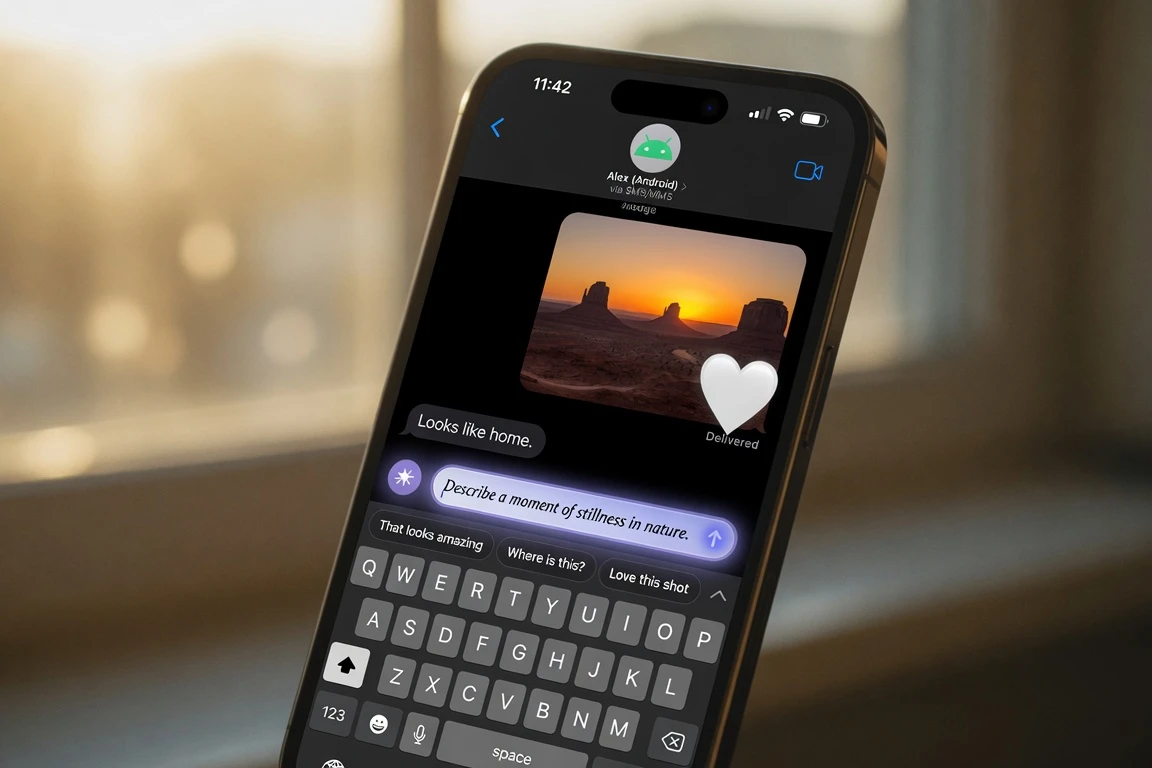
iOS 27 beta 2 removes the Writing Tools menu that has been part of the system since iOS 18.1. In its place, a “Write with Siri” prompt sits in the keyboard suggestions bar of Notes, Mail, Messages, and any third-party app that uses Apple’s standard system text components. Tapping it opens a natural-language input field that slides down from the Dynamic Island, where the user describes what they want in their own words.
The shift is bigger than a rename. Writing Tools asked the user to pick a preset tone, such as “Friendly” or “Professional,” from a fixed menu, and it required the user to select text first. Write with Siri accepts open-ended instructions to generate, proofread, or rewrite text in a different register, and the prompt surfaces before the user types a single character. Apple’s on-device language model is approximately 3 billion parameters, optimized through 2-bit quantization-aware training and a KV-cache sharing technique that cuts memory bandwidth on long contexts, and the base inference runs locally so drafts do not leave the device for the most common operations.
More demanding requests can escalate to Apple’s server-side model, which runs on Apple extending Private Cloud Compute to Google Cloud infrastructure. Users who want to audit which path a request took can check Settings, then Privacy and Security, then Apple Intelligence Report, where Apple logs each request’s destination.
RCS Threads Reach a Two-Year-Old Standard
Beta 2’s second big move is in the Messages app, where Apple has added inline replies to RCS conversations with Android users. A long press on a message in an RCS chat now surfaces a reply option, and the thread that follows quotes the specific message, the same interaction pattern that has long existed inside iMessage, including the Tapback reactions feature in iPhone Messages. Apple has also fixed a long-running display bug: when an iPhone user reacted to an image in an RCS chat, Android recipients used to receive a separate text message like “[name] loved an image” rather than seeing the emoji on the image itself. iOS 27 renders the emoji directly on the image or video, matching iMessage.
The context for the change sits in the spec Apple chose not to ship two years ago. The GSMA, the mobile industry body that sets the standard, published Universal Profile 2.7 in June 2024, and inline threading was among its headline additions, while Apple launched iOS 18 with RCS support in September 2024 on Universal Profile 2.4, a specification from October 2019. The GSMA has since published Universal Profile 3.0 and 4.0, so iOS 27 brings iPhones to UP 2.7 compliance while the standards body is two versions further ahead.
There are caveats. For RCS reply threading to work, both the iPhone and the Android device, and their respective carriers, must support RCS, and most major US carriers use Google’s Jibe platform. Macworld described the inline reply feature as “quite buggy” in this early beta, and it does not always behave as expected. iOS 26.5 had already added encryption for RCS messages between iPhone and Android users, and beta 2 is the next step in closing the gap with iMessage.
| RCS feature | iOS 26 behavior | iOS 27 beta 2 behavior |
|---|---|---|
| Inline reply to a specific message | Not supported | Long-press a message, then reply, threads the conversation |
| Tapback/reaction emoji on an image or video | Android sees a text descriptor like “[name] loved an image” | Emoji renders on the image or video, matching iMessage |
| GSMA Universal Profile level | 2.4 (October 2019) | 2.7 (June 2024) |
Smaller Changes Stacked Across the Build
Beyond the two lead features, beta 2 carries a long list of small changes across Apple’s own apps. The Home app can now update an Apple TV’s software remotely, so the set-top box no longer has to be turned on first, and the Apple TV appears in the Updates section of the Home app’s Settings, where tapping the update button installs the latest software without waking the device.
Wallet gains a new Insights tab. Tapping the three-dot icon in the upper right opens a splash screen that says users will be able to connect financial accounts to Wallet to see spending insights, recurring transactions, and account balances, though the feature is not fully implemented in the current build. The Photos app’s AI editing tools, which were limited to standard images in beta 1, now work on RAW files, a small but useful change for anyone who shoots in a raw workflow. A Visual Intelligence option called Highlight to Image Search now lives in the Siri section of Settings, off by default, with Apple noting that turning it on will send highlighted subjects to third parties to find similar images.
The Camera app adds yellow highlights around the camera tools button when a hidden feature like exposure adjustment is enabled. The Weather app’s light blue text, covering precipitation levels, the condition descriptor, and the wind mph reading, has been re-toned brighter for legibility. The Siri app can now delete multiple conversations at once, the Create a Pass flow in Wallet has texture options for color choices, and long-pressing a HomeKit Secure Video motion alert now plays the video clip and surfaces a shortcut to turn on lights near the camera.
The HomeKit change also resolves a beta 1 bug that left accessories like Philips Hue lights unresponsive on devices running iOS 27 and tvOS 27. A separate code path in iOS 27 will surface a notification when an iCloud backup fails to complete, reading that there is a problem with Apple’s server and asking the user to try again later.
- Apple TV remote update: Install tvOS updates from the Home app on iPhone without turning the Apple TV on first.
- Wallet Insights: A new splash screen hints at spending insights, recurring transactions, and account balances once accounts are connected.
- Photos AI for RAW: The AI editing tools in Photos now work on RAW images, not just standard JPEGs.
- Visual Intelligence toggle: A Highlight to Image Search option appears in Settings under Siri, off by default, with Apple warning that highlighted subjects will be sent to third parties.
- HomeKit camera long-press: Long-pressing a motion alert plays the video clip and offers a shortcut to turn on lights near the camera.
- iCloud backup notifications: A new code path surfaces a notification when an iCloud backup fails to complete, with Apple’s text asking the user to try again later.
AirPort Utility Departs as Siri AI Skips the EU and China
Beta 2 also marks the end of the road for one of Apple’s older first-party apps. The AirPort Utility app will no longer be available for download in iOS 27, according to the beta’s own text, though users who already have the app installed can re-download it, and Apple does not guarantee that AirPort Utility functionality will continue to work. The change closes a chapter on Apple’s discontinued AirPort router line, which the company stopped selling years ago and which the AirPort Utility app was originally built to manage.
The second exclusion is geographic. Apple has confirmed that Siri AI will be absent from iOS and iPadOS in the European Union when iOS 27 ships this fall, because the company and EU regulators have not reached agreement on how to implement the features without what Apple characterized as requirements for “nearly unlimited device access” under Apple’s interpretation of the EU’s Digital Markets Act, or DMA. Mac and Apple Vision Pro users in the EU can access Siri AI when set to a supported language, and Siri AI is also unavailable in China pending regulatory approval.
Craig Federighi, Apple’s senior vice president of Software Engineering, stated the company has no current timeline for EU availability on iOS or iPadOS. Apple Intelligence is launching with support for sixteen languages, per the WWDC 2026 preview of Siri AI and Apple Intelligence: English, Danish, Dutch, French, German, Italian, Norwegian, Portuguese, Spanish, Swedish, Turkish, Vietnamese, Simplified Chinese, Traditional Chinese, Japanese, and Korean. The most powerful on-device AI model, which enables features such as expressive voice customization, requires iPhone 17 Pro or iPhone Air.
The Path From Beta 2 to the iPhone 18 Launch
Apple released iOS 27 beta 2 to registered developers on June 22, 2026, as build 24A5370h, listed in the developer program as the iOS 27 beta 2 release entry. The build ships alongside iPadOS 27, macOS Golden Gate (macOS 27), tvOS 27, and visionOS 27, and it can be installed through Settings, then General, then Software Update, with Beta Updates set to iOS 27 Developer Beta. A public beta is expected to arrive in July through beta.apple.com, and the final release is scheduled for September 2026 alongside the iPhone 18, with the wider Apple hardware roadmap also pointing to the AirPods with cameras slated for late 2027.
iOS 27 itself installs on iPhone 11 and newer, including iPhone SE 2 and later. Siri AI features, including Write with Siri, require Apple Intelligence-capable hardware, generally iPhone 16 or later, and the most powerful on-device AI features need iPhone 17 Pro or iPhone Air, while Apple advises against installing beta software on a primary device.
- June 8, 2026: Apple previews iOS 27, iPadOS 27, macOS 27, watchOS 27, visionOS 27, and tvOS 27 at WWDC, including the new Siri AI and the next generation of Apple Intelligence.
- June 22, 2026: iOS 27 beta 2 (build 24A5370h) released to registered developers.
- July 2026: First iOS 27 public beta planned through beta.apple.com.
- September 2026: iOS 27 public release scheduled, alongside the iPhone 18 launch.
Frequently Asked Questions
What is Write with Siri in iOS 27?
Write with Siri is Apple’s system-wide AI writing assistant, introduced in iOS 27 beta 2, that replaces the Writing Tools panel that shipped with iOS 18.1. It appears as a prompt in the keyboard suggestions bar of Notes, Mail, Messages, and any app using Apple’s standard system text components. Tapping the prompt opens a natural-language input field that slides down from the Dynamic Island, where users describe what they want in plain language, and the base inference runs on-device.
Does iOS 27 fix RCS messaging between iPhone and Android?
Beta 2 adds inline replies to RCS conversations, matching the long-press pattern iMessage has used for years. The same build fixes a separate bug where tapback emoji on images and videos in RCS chats appeared as text descriptors like “[name] loved an image” rather than the emoji itself. For threading to work, both devices and their carriers must support RCS. Macworld described the inline reply feature as “quite buggy” in this early beta.
When does iOS 27 come out?
Apple released iOS 27 beta 2 to developers on June 22, 2026, as build 24A5370h. A public beta is planned for July 2026, and the final release is scheduled for September 2026 alongside the iPhone 18 launch.
Which iPhones support Siri AI and Write with Siri?
iOS 27 itself installs on iPhone 11 and newer, including iPhone SE 2 and later. Siri AI features, including Write with Siri, require Apple Intelligence-capable hardware, generally iPhone 16 or later, and the most powerful on-device AI features need iPhone 17 Pro or iPhone Air. Siri AI is not available in the EU or China when iOS 27 ships this fall.
What changes for the Home app in iOS 27?
The Home app can update an Apple TV’s software remotely, so the set-top box does not need to be turned on first. Long-pressing a HomeKit Secure Video motion alert now plays the video clip and surfaces a shortcut to turn on lights near the camera, and beta 2 also restores responsiveness to HomeKit accessories like Philips Hue lights that went dead on iOS 27 beta 1.
Is AirPort Utility going away in iOS 27?
Yes. AirPort Utility will no longer be available for download in iOS 27. Users who already have the app installed can re-download it, but Apple does not guarantee that AirPort Utility functionality will continue to work, making the change a soft deprecation rather than a hard removal.
 Messi Overtakes Klose and Marta as All-Time World Cup Top Scorer
  Valve’s Steam Machine Costs $1,049. The Memory Crisis Made It So
  Samsung Display Approved to Build OLED Panels for Apple’s Foldable iPhone
  Android’s June 2026 Google System Updates: Full Changelog
  Gold Holds Near $4,200 as Oil Eases Inflation, Fed Caps Rebound
  Delhivery Shares Climb as MOSL Reiterates Buy With Rs 580 Target