
 Ishan Crawford
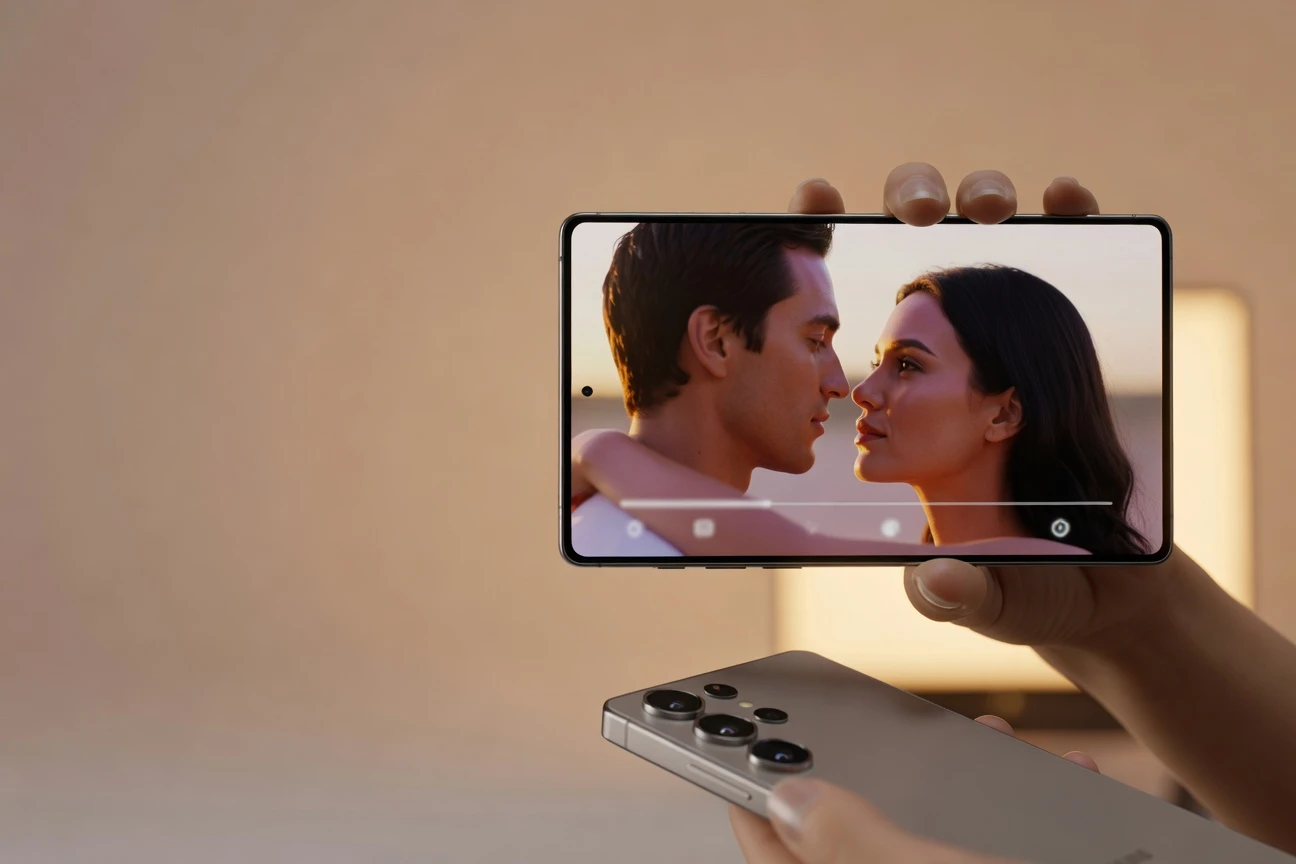
 Samsung Electronics shipped its Cinematic Look-Up Table (Cine LUT) feature with the Galaxy S26 Ultra on March 11, building on the new Advanced Professional Video codec the company released as open source last year. Four preset looks sit one tap deep inside the Gallery app and reinterpret footage shot in Samsung Log, the camera’s flat color profile, into something closer to a theatrical grade.
The looks come from a two-year collaboration between Samsung’s Mobile eXperience (MX) Business, Samsung Research, and U5K Imageworks, a Seoul colorist studio whose recent credits include the 2023 Yoon Je-kyun feature “Hero” and Netflix Korea’s 2025 action series “Trigger.” The partnership began as Rec. 709 conversion LUT advisory work for the log format and grew into the four-palette set shipping with the device.
How the Look-Up Table Reshapes the Color Pipeline
A look-up table is a mathematical map that translates one set of color values into another. Standard phone filters paint a tint over already-processed footage; the new feature works further upstream, reading the wider tonal range preserved by the log format and remapping it from there. Bomi Kim, who leads the project at Samsung Research’s Reality Media Lab, told the company’s newsroom that the system is “optimized for Log video,” using the format’s “wide gradation” to “precisely reconstruct color and brightness.”
The capture-side workflow stays familiar. Open the camera, switch to Pro Video, enable Samsung Log. Footage records flat and desaturated, the way professional cameras have shot for two decades. Inside the Gallery app afterward, a single tap layers a chosen look onto the clip, with a live preview that updates as the user scrubs the timeline.
We wanted to create an experience that lets users preview cinematic footage at the moment of capture, then apply a LUT and share the video with a single tap in the Gallery.
That is Sugon Baek of the MX Business Camera Image Quality R&D Group, in the Samsung Newsroom developer roundtable from May. Capture-and-grade as a single act, rather than two stages separated by an export and an import, is the workflow shift the team is selling.
U5K Imageworks Brings Theatrical Credits Into a Phone Camera
U5K Imageworks runs out of Mapo, Seoul, and has spent roughly a decade grading Korean theatrical and streaming productions, according to the studio’s published project list. Recent feature work includes the 2024 Park Beom-soo sports drama “Victory” alongside Yoon’s Hero. Television credits add the 2024 Netflix Korea disaster drama “The Fools of the Apocalypse” and the 2025 thriller “Trigger.” The company also runs a visual effects and CGI arm beside its color suites.
Taesik Eom, the studio’s chief executive, said the relationship with Samsung began as Rec. 709 conversion LUT advisory roughly two years ago, refining strong colors into more natural tones suitable for a small-screen viewing context. That groundwork led directly to the Cine LUT brief.
“We developed multiple versions across three intensity levels, neutral, soft and strong, and tested them in diverse scenes, ultimately selecting four core styles,” Eom said. The studio ran each candidate through changing exposure, mixed lighting and varied subjects to weed out looks that broke under real-world conditions before settling on the shipping palette.
The result is a tighter loop between cinema-room color suites and consumer mobile capture than the industry has seen before. The same colorist who graded Yoon’s theatrical release in 2023 spent two years tuning the looks now baked into a phone. The lineage of distinctive cinematic color palettes that defines classic film, from Wong Kar-wai’s amber-bath neons to the Coens’ green-blue Deakins look, is the visual grammar Samsung is laddering toward.
The Four Looks Compared
The four styles each map to a recognizable corner of cinematic shorthand. Choice depends on lighting and tone rather than subject matter. Here is how the looks resolve in practice, based on the developer interview and Eom’s color-direction notes.
| Look | Genre Cue | Best-Fit Scenes | Color Logic |
|---|---|---|---|
| Blockbuster | High-contrast tentpole | Outdoor, urban, action | Crushed shadows, saturated mids, cooled highlights |
| Coming-of-age | Soft, contemporary indie | Cafes, vlogs, lifestyle | Lifted blacks, warm midtones, low contrast |
| Romance | Warm, character-led | Portrait, golden hour, interior | Gentle skin tones, magenta-cream highlights |
| Thriller | Moody, restricted palette | Night, low-key, interior | Teal shadows, desaturated chromatics, lifted contrast |
Blockbuster reads as a teal-and-orange contrast push, the same shorthand most Hollywood tentpoles have used since the early 2010s. Coming-of-age borrows the milky pastel grading common in Korean lifestyle vlogs and recent A24 indie productions. Romance lands closest to a warm Kodak Vision3 emulation. Thriller works the Nolan and Villeneuve register, cooled shadows and saturation pulled back.
“Blockbuster suits high-contrast environments like outdoor and urban scenes; Coming-of-age fits soft, trendy settings like cafes or vlogs; Romance adds warmth to character-driven scenes; and Thriller creates a more striking impression,” Eom said in the same interview.
Sitting on Top of Samsung’s New Codec
None of the look-up work matters without a recording format that preserves enough color data to be regraded after the fact.
That format is Samsung’s Advanced Professional Video codec, which the company first detailed at the Samsung Developer Conference in late 2023 and released as open source on GitHub. The Galaxy S26 Ultra was the first phone to ship with native support at launch.
The codec is intra-frame. Each frame is compressed independently, the way ProRes and DNxHR work, which makes it heavy on storage but kind to edit-bay scrubbing. It records 4:2:2 chroma subsampling rather than the 4:2:0 standard in consumer formats, giving editors twice the horizontal color resolution to work with in post.
The Ultra ships two profile tiers, according to Samsung’s developer documentation for the format:
- 422 HQ: about 198 Mbps at full HD 30, 796 Mbps at 4K 30 and 3,184 Mbps at 8K 30. Visually lossless target.
- 422 LQ: about 101 Mbps at full HD 30, 406 Mbps at 4K 30 and 1,624 Mbps at 8K 30. Smaller files for longer takes.
Samsung claims roughly 10% better compression efficiency than comparable intra-frame codecs at matched visual quality. The IETF published the format as RFC 9924 last year, the standards-track confirmation Adobe Premiere users have started citing in feature-request threads. As of mid-May 2026, Premiere does not yet decode the format natively. Blackmagic’s free Camera app for Galaxy, ported in March, added recording support at launch.
Where the Pro Colorist Moat Still Holds
Four presets do not equal a working colorist. The professional pipeline guards several stages that stay outside the phone, even in the new workflow:
- Scene-by-scene grading. A theatrical colorist tunes the look shot by shot, sometimes frame by frame, balancing skin tones across cuts and matching exposure between cameras. The Gallery applies one look to a whole clip.
- Primary correction before the creative grade. Pros normalize exposure, white balance and noise before any look lands. The mobile workflow skips primaries.
- Resolve-grade scopes. Vectorscopes, waveforms and false-color tools live in DaVinci Resolve and Baselight, not in the Gallery.
- Custom LUT import. The Ultra ships four. Third-party .cube file imports, the way Apple’s Final Cut Pro for iPad handles user LUTs, are not user-installable as of launch.
- Wide-gamut delivery. Final masters target Rec. 2020 or DCI-P3 spaces. Phone-sourced delivery still routes through Rec. 709 sRGB or HDR10 in most consumer apps.
This is roughly the gap any prosumer toolchain has against a professional one: speed and accessibility on one side, granularity and control on the other. Cine LUT aims at the 99% of Galaxy creators who would never open Resolve, giving them a route to a presentable cinematic grade in under ten seconds. Replacing DaVinci was never the goal.
Apple’s Counter and the Mobile Cinema Race
Apple shipped Apple Log on the iPhone 15 Pro in late 2023, then expanded it to Apple Log 2 on the iPhone 17 Pro a year ago. The capture side reads similarly to Samsung’s: a flat, wide-gamut log profile waiting to be graded. The delivery side does not. iOS keeps LUT application outside Photos. Users route footage through LumaFusion, Final Cut Camera or DaVinci Resolve on iPad to apply looks. There is no one-tap Gallery equivalent.
Sony’s Xperia 1 VI carries the closest match on the Android side, with a Cinematography Pro mode that mirrors the company’s CineAlta camera UI. It ships preset looks but no native log-to-look pipeline matching the Galaxy approach. The competitive pressure runs both ways.
If the open-source codec wins editor-side adoption, especially inside Adobe’s Premiere Pro feature-request thread for native ingest, the Galaxy line gains a delivery moat to match its capture one. If it stalls at GitHub and Blackmagic, the four LUTs stay a Galaxy halo feature: polished, well-grounded in real colorist work, but contained inside Samsung’s wall.
Frequently Asked Questions
Which Galaxy Models Support the Feature?
The feature debuts on the Galaxy S26 series. Native recording in the underlying codec, the format the look depends on, is exclusive to the Ultra model at launch. Samsung has not confirmed any backport to earlier Galaxy generations, though basic Samsung Log video has been available on prior flagships through the Pro Video mode.
Do I Need to Shoot in Samsung Log to Use It?
Yes. The feature is built around the wide gradation of Log footage and remaps that data into the chosen look. Applying any of the four styles to a clip captured in the standard HDR or SDR camera mode produces a flatter, less dramatic result and is not the intended workflow.
Can I Import Custom LUTs From DaVinci Resolve?
No, not at launch. The four shipping styles are the only options available inside the Gallery editor. Third-party .cube file import is not supported on Galaxy S26 series devices as of the May 2026 software build.
How Much Storage Does the APV Codec Consume?
Heavy. At full HD 30 frames per second, the higher-quality 422 HQ profile records at about 198 megabits per second, which works out to roughly 1.5 gigabytes per minute. 4K capture multiplies that figure roughly fourfold, and 8K capture multiplies it sixteenfold, pushing past 3 Gbps at the top end.
Is the Recording Format Proprietary to Samsung?
No. Samsung released the format as open source through the OpenAPV project on GitHub, and the IETF published it as RFC 9924. Third-party software can implement decode and encode support without licensing fees, though most major non-linear editors had not shipped native support as of mid-May 2026.
 SEBI CAS Forces Options Traders to Recalibrate Closing Risk
  Sensex Drops 400 Points as Oil Spike Tests Market Resilience
  Ardee Industries IPO Rides Lead Recycling Boom at Discount
  Gold Nears 4300 but Iran Risks Cap Gains Ahead of NFP
  Scotland Construction Stalls as Skills and Tariffs Blunt Infra Gains
  Lok Sabha Bill Opens UPI Charges Path for Banks Over Merchants