
 Ishan Crawford
 Samsung’s Smart Switch under One UI 9 now pulls passwords, passkeys, call history, accessibility settings and eSIM data from an iPhone to a Galaxy Z Fold8 Ultra, Z Fold8 or Z Flip8 over a wireless link that starts with a QR code and needs no separate app on the Apple side.
The change lands with the eighth-generation foldables and aims at the practical friction that once made leaving iOS feel like starting over.
How the New QR Transfer Works
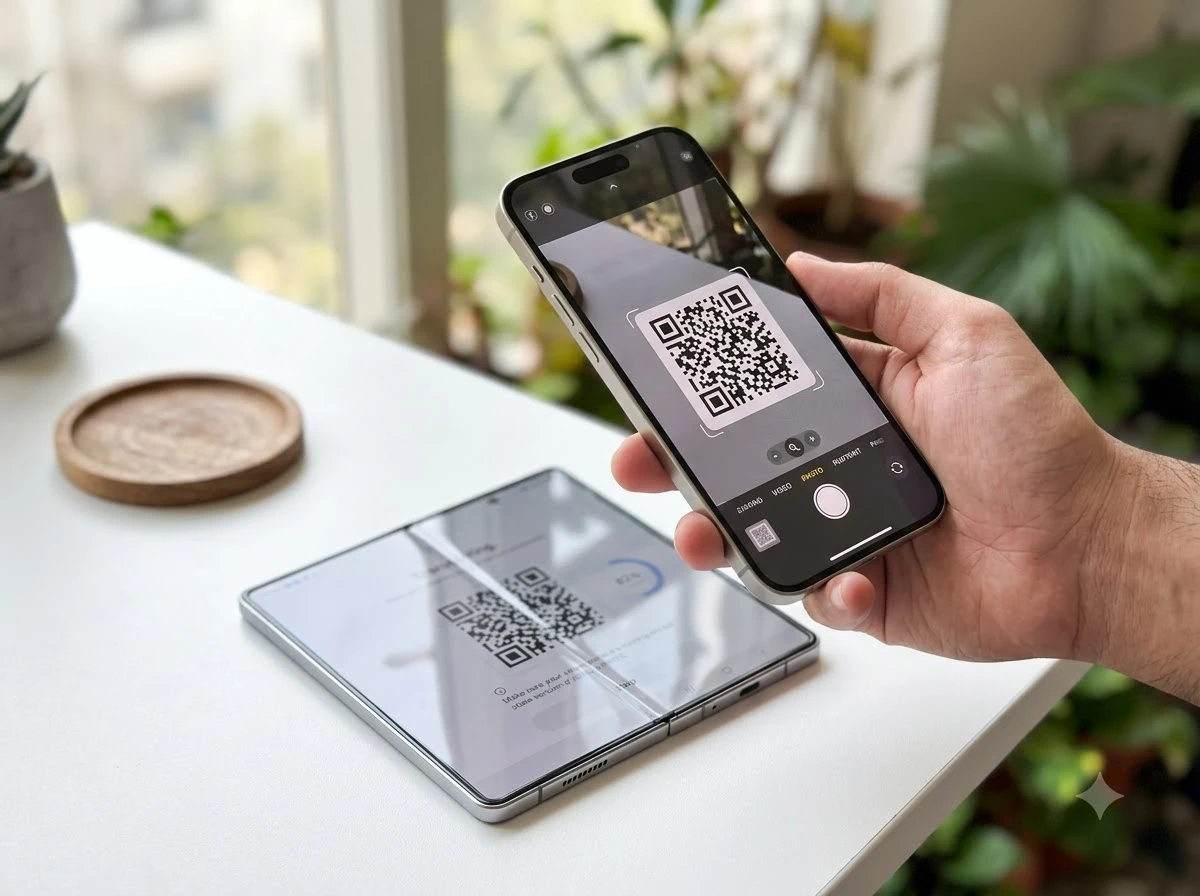
On a Galaxy running One UI 9, open Smart Switch, choose Receive on this phone, then iPhone/iPad. The phone shows a QR code. The iPhone user opens the Camera app, scans it, selects Transfer to Android and continues. A second scan finishes pairing. The devices talk wirelessly; no cable or Lightning-to-USB-C adapter is required.
Samsung removed the old step of installing its Smart Switch app on the iPhone first. The company describes the QR code wireless transfer under One UI 9 as the default path for new Z-series owners. The same flow works after initial setup if the user skips it at first boot.
Requirements are strict: the Galaxy needs Android 17 or later with One UI 9; the iPhone or iPad needs iOS 26.6 or later. The upgraded method is available outside mainland China. Older software still uses the previous app-plus-cable or iCloud routes.
- Launch Smart Switch on the Galaxy and select receive from iPhone/iPad.
- Scan the displayed QR code with the iPhone Camera app.
- Confirm Transfer to Android and complete the second scan if prompted.
- Choose which data categories to move and start the transfer.
- Optionally finish WhatsApp or LINE chats later (those still need a cable).
After the main load finishes, Smart Switch can prompt for remaining chat archives. Users should also deregister iMessage on Apple’s site so SMS routes correctly to the new number.
The two-scan pairing is the mechanism that replaces the old app install. Once the phones recognize each other, the session carries the expanded data set in one pass rather than forcing a second wired trip for credentials. Skipping the flow at first boot does not lock the user out; the same QR path stays available inside Smart Switch later, which matters when someone wants the new Fold working first and the full import second.
Version floors still decide who can use the wireless route at all. A Galaxy below Android 17 or an iPhone below iOS 26.6 falls back to the earlier methods. That keeps the upgrade path clean for current flagships while leaving older handsets on familiar ground.
What Moves From iOS Now
Previously supported items such as photos, videos, messages, contacts, calendars and apps remain. One UI 9 adds several categories that used to demand a cable or manual re-entry, and makes the full set available wirelessly.
| Data type | Before One UI 9 (typical wireless) | One UI 9 wireless |
|---|---|---|
| Passwords and passkeys | Limited or cable-only | Supported |
| eSIM information | Not available or carrier app only | Supported (carrier-dependent) |
| Call history | Often missing wirelessly | Supported |
| Accessibility settings | Manual recreate | Supported |
| Wi-Fi networks | Partial | Supported |
| Home screen layout and gestures | Partial | Supported |
| Photos, contacts, messages, calendars, apps | Supported | Supported |
Samsung notes that a saved password means one less account to set up again, accessibility settings reduce the need to rebuild a personalized experience, and eSIM information makes it easier to keep an existing mobile setup. The full wireless steps and data list for One UI 9 also covers alarms, voice memos, notes, music (DRM-free), documents and wallpaper.
App data transfer still depends on what each developer allows. Some third-party apps require extra steps or a cable.
The practical gain is less about any single new row in the table and more about the combination. Passwords, passkeys, call history and accessibility settings used to arrive in pieces or not at all over wireless. Moving them in the same session as photos and contacts shortens the gap between unboxing and a phone that already knows how the user works.
Home screen layout and gestures traveling with Wi-Fi networks further cuts the first-day cleanup. The user still has to judge which third-party apps will hand over their data cleanly, yet the system-level items no longer wait on a cable or a manual rebuild.
Why Switching Used to Feel Expensive
For years the cost of leaving iOS sat less in the hardware price and more in the hours of re-typing logins, re-scanning QR codes for two-factor apps, calling the carrier about the number, and rebuilding accessibility or gesture habits. eSIM-only phones made the number itself sticky; a failed transfer could mean a store visit or multi-day wait.
Regulatory pressure changed the background. The EU Digital Markets Act pushed major platforms toward better data portability. Google’s own Android 17 migration tools now move passwords, Wi-Fi credentials and eSIMs wirelessly from recent iOS versions. Samsung’s update sits inside that same wave rather than inventing it alone.
iMessage history, certain paid app purchases and deep Continuity features still stay behind. The lock-in never vanished. But the daily-use items that once took the longest to recreate now travel with the phone.
These may be less visible than a photo library, but they can make a big difference to how quickly a new device feels ready to use. A saved password means one less account to set up again. Bringing over accessibility settings can reduce the need to recreate a personalized experience. eSIM information can also be transferred, making it easier to continue using an existing mobile setup.
Samsung Global Newsroom, 25 August 2026
The old friction stacked in small tasks. Each login retyped, each accessibility toggle reset, and each carrier call added minutes that felt larger than the hardware price difference. Wireless movement of those same items compresses that stack into a single guided session.
Google’s parallel work on Android 17 shows the direction is platform-wide. Samsung’s One UI 9 path aligns the Z Fold8 Ultra, Z Fold8 and Z Flip8 with that baseline so foldable buyers meet the improved tools on day one rather than waiting for a later software drop.
Who Feels the Change First
Right now the upgraded path is live on the Galaxy Z Fold8 Ultra, Z Fold8 and Z Flip8. One UI 9 beta builds on the Galaxy S26 series have not yet included it; Samsung expects broader availability once the software exits beta and reaches more models.
Foldable buyers are the clearest early audience. Many already own an iPhone as a second or previous device and treat the Fold as an experiment. Lower setup risk makes that experiment cheaper. Multi-device households that mix Galaxy and iOS also gain when Quick Share can talk to AirDrop.
Good Lock lets switchers tweak swipe gestures, home-screen layout and app-switching behavior so the new phone can feel closer to the old one from day one. Samsung positions this as reducing the adjustment period rather than forcing users into a pure One UI style.
Early access on the Z8 line means the people most likely to test a foldable form factor also receive the lightest off-ramp from iOS. That pairing is deliberate: the hardware already asks the user to learn a new shape, so cutting credential and number friction keeps the trial focused on the screen rather than on account recovery.
Households that keep both platforms benefit next. A person who moves one line to Galaxy can still share files with family iPhones through the enhanced Quick Share path, so the switch does not isolate them from the rest of the group.
File Sharing After the Move
Quick Share on One UI 9 and One UI 8.5 receives an enhanced cross-device mode. AirDrop compatibility lets Galaxy phones exchange files with iPhones, iPads and Macs. The feature first appeared on S26 models and has expanded through One UI 8.5 to S25, S24 and recent Z series devices; select flagships including the new Z8 models carry it at launch, with more models planned.
That continuity matters because friends and colleagues rarely switch platforms in lockstep. A user who moves to Galaxy can still drop photos to an iPhone user without a third-party app or cable.
Rollout order across the lineup:
- S26 models received the enhanced cross-device mode first.
- One UI 8.5 carried it to S25, S24 and recent Z series devices.
- New Z8 flagships ship with it at launch.
- Additional models are planned after that wave.
Keeping AirDrop-compatible sharing in place after the Smart Switch session closes the loop on daily use. The migration moves the personal data; the sharing layer keeps the social and work threads intact even when the other person stays on iOS.
Where the Limits Still Sit
eSIM transfer availability varies by carrier and region. Some networks support the hand-off; others still require their own app, a QR from the account portal, or a shop visit. Network-locked SIMs or already-active eSIMs on the new phone can block the option. Samsung’s footnotes and support pages flag this repeatedly.
WhatsApp and certain chat apps often need a cable even on One UI 9. Large media libraries benefit from a prior move to Google Photos to free space. Transferable data still depends on OS versions and connection method. The device and OS version requirements outside China list Android 17 and iOS 26.6 as the floor for the new wireless path.
On X, early posts from Samsung-focused accounts treated the QR-plus-passwords package as the practical barrier drop for Fold buyers, with engagement clustering around the “no app install” and eSIM lines. Carrier variance and the remaining iMessage gap draw the quieter caveats in replies.
The old Smart Switch paths remain for devices that miss the software cut-off. Users on older Galaxy or iOS builds keep the cable, iCloud or PC backup routes.
Remaining friction points fall into a short list:
- Carrier and region rules can still block eSIM hand-off.
- WhatsApp and some chat archives often need a cable.
- iMessage history and deep Continuity features stay on Apple’s side.
- Older OS builds fall back to cable, iCloud or PC methods.
None of those limits cancel the wireless gains on passwords, passkeys, call history and accessibility settings. They do set expectations so a buyer knows which tasks end at the QR session and which ones still need a follow-up step.
Carrier Rules Decide the eSIM Outcome
eSIM support in Smart Switch is only as strong as the network behind it. When the carrier allows the hand-off, the number can move inside the same wireless session that brings passwords and call history. When the carrier does not, the user still faces the familiar portal QR, carrier app, or store visit.
Network-locked SIMs and eSIMs already active on the new Galaxy add further gates. Samsung’s support material repeats those warnings because a blocked number transfer undoes much of the setup speed the rest of the tool delivers. Checking carrier policy before the unboxing day remains part of a clean switch.
The split explains why early reaction on X celebrated the eSIM line while replies stayed cautious. The feature is real on the Samsung side; the last mile still belongs to the operator.
Foldable Trials Get a Lower Entry Cost
A Z Fold8 Ultra, Z Fold8 or Z Flip8 already asks the buyer to adapt to a different screen shape and app layout. Adding hours of credential work on top raised the cost of that trial. Wireless movement of passwords, passkeys, accessibility settings and, where carriers allow it, the phone number itself removes a large share of that overhead.
Good Lock then shortens the remaining gap. Gesture and layout tweaks let the new device echo familiar habits instead of demanding a full style reset on day one. Together with AirDrop-compatible Quick Share, the package keeps both the personal setup and the wider contact list workable while the user decides whether the foldable form stays.
Broader One UI 9 availability on more models will spread the same path beyond the Z8 launch set. Until then, the eighth-generation foldables carry both the hardware experiment and the lightest current off-ramp from iOS.
Samsung’s update does not erase ecosystem differences. It does move the highest-friction daily credentials and the phone number itself onto the same wireless session that already handled photos. For anyone weighing a Z Fold8 against another year of iPhone, that changes the setup arithmetic more than another camera upgrade would.
 Scotland’s Facial Recognition Push Sparks Mask Ban Call
  Galaxy Z Flip 8 Hits $799 Only If Your Trade-In Qualifies
  If England Had Kept Water Public Like Scotland
  Old Firm Spend Pulls Clear as Premiership Rivals Patch Squads
  Chinese Studios Quietly Seize the Gamescom Stage
  Vivo V80 Lite 5G Hits Pakistan With Curved Screen and Split Identity