
 Ishan Crawford
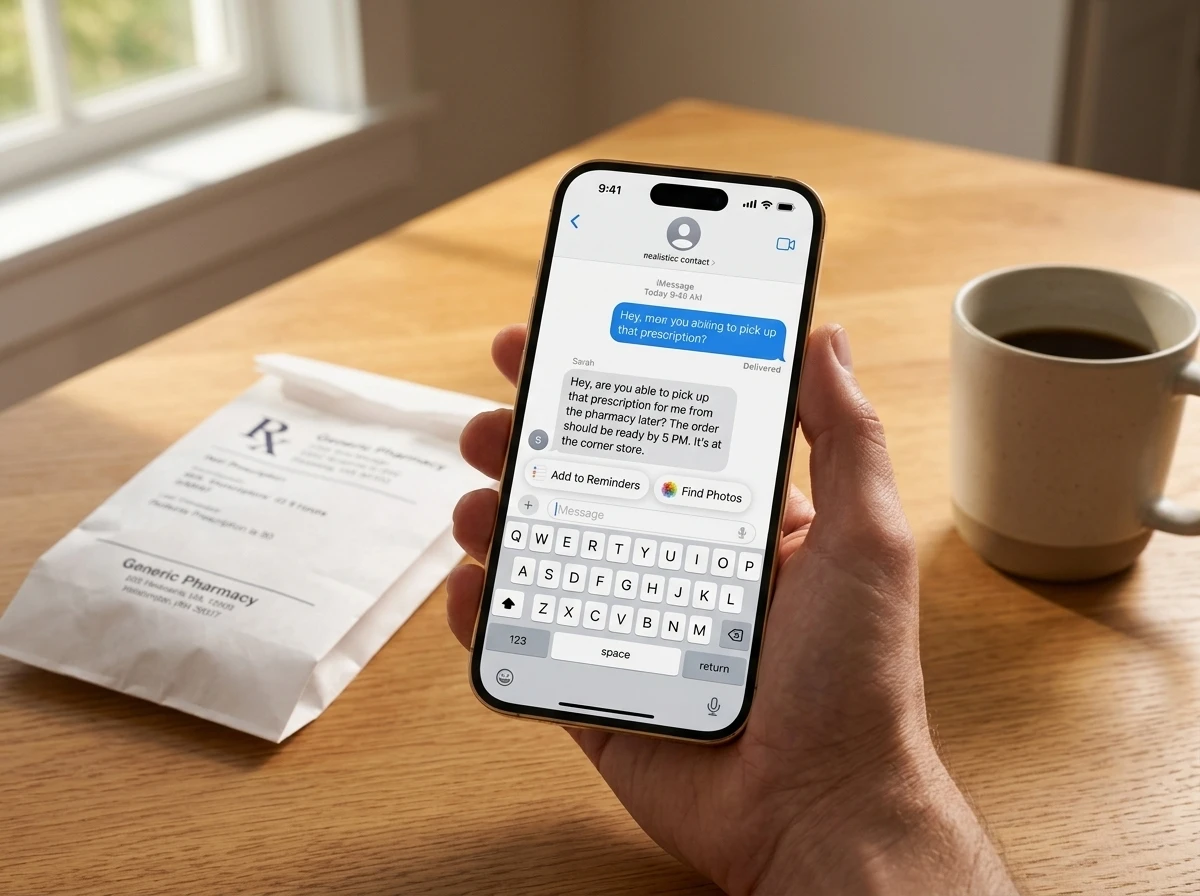
 iOS 27’s Messages app now surfaces one-tap suggestions that turn ordinary chats into ready-made reminders, notes, calendar events and photo searches. In the beta the feature already feels less like AI theater and more like a permanent shortcut that feeds the rest of the system.
Apple announced the capability in June as part of the next wave of Apple Intelligence. Hands-on reports from the beta confirm it works quietly enough that many users may never call it AI at all.
How the Suggestions Surface in a Thread
Private on-device intelligence reads the conversation, spots actionable language, and offers a button right under the relevant bubble or above the keyboard. No extra prompt is required.
Ryan Christoffel at 9to5Mac tested it extensively and called it the best new Messages addition for pure convenience. One concrete case: his wife texted a request to pick up prescriptions at CVS. The suggestion created a reminder titled “Pick up prescriptions” with the full original request already filled into the notes field.
Messages offers one-tap suggestions based on the context of users’ conversations, making it easier than ever to get things done, such as creating a reminder or a note. For example, if someone asks for photos, Messages can also help users find the right ones, recognizing keywords, locations, and people in their library to find the best options.
That language comes straight from Apple’s June newsroom release describing the one-tap suggestions based on conversation context.
The same engine powers Smart Reply that now matches a user’s personal writing style. The suggestions simply go further by leaving the chat and acting inside other apps.
What One Tap Can Trigger
Early coverage and Apple’s own materials list a clear set of actions. They appear only when the context fits, so the interface stays uncluttered.
| Action | What It Creates or Does | Source Context |
|---|---|---|
| Create Reminder | New Reminders item with title and full details | Requests, errands, deadlines |
| Create Note | New Notes entry carrying the conversation snippet | Ideas, lists, shared info |
| Add Calendar Event | Event with time, place and contacts when mentioned | Plans, coffee dates, meetings |
| Find Photos | Photo picker filtered by people, places, keywords | “Send the beach pics” |
| Call Person | Direct dial of a named contact | Name mentioned in thread |
| Save Shared Photo / Take Photo | Library save or camera launch | Media requests |
USA Today reported additional options such as starting an email. Apple’s Get things done with Suggestions overview highlights the calendar and photo paths as core examples. Mail receives the same more-capable suggestions, including third-party app actions.
Why On-Device Processing Changes the Stakes
Everything runs locally. Apple’s privacy pages stress that the models stay aware of personal data without collecting it. No conversation content leaves the device for these suggestions.
- On-device only: keyword, location and people recognition never hits Apple servers for this feature.
- No training on your chats: the foundation models powering Apple Intelligence keep personal context private by design.
- Works offline: once the models are on the phone, basic suggestion logic does not need a network.
- User control: Apple Intelligence can be disabled system-wide if preferred.
That architecture is the reason a privacy-conscious user can accept the feature. It also explains why the suggestions feel fast and why they include rich context instead of generic titles.
The Quiet Polish Surrounding the New Buttons
One-tap suggestions sit inside a larger Messages refresh that favors reliability over spectacle. MacRumors catalogued the supporting changes:
- Faster loading and scrolling in long threads with thousands of attachments
- More reliable sync of messages, read states and reactions across iPhone, iPad, Mac, Watch and Vision Pro
- Thumbnails and search for media offloaded to iCloud
- Background continue-and-resume for multi-photo or video sends
- Automatic retry of failed messages
- Consolidated notifications when several Tapbacks arrive at once
- Search by nickname or phone number
- Faster appearance of brand-new camera shots in the picker
- Drawing tools pulled in from Notes for in-thread sketches
- RCS 2.7 upgrades for Android users: inline replies, proper emoji reactions, edit and delete
Those fixes remove daily friction. The suggestions then convert the cleaned-up conversation into action. Earlier beta coverage already tracked earlier iOS 27 beta Write with Siri and RCS changes, showing the same steady refinement pattern.
Who Benefits Most
Forgetful texters gain the obvious win. A request that once vanished into the scroll now becomes a dated reminder with the original wording attached. Families coordinating errands, friends planning weekends, and coworkers dropping quick tasks all see the same pipeline effect.
The second-order winners are the destination apps themselves. Reminders, Notes, Calendar and Photos receive higher-quality, pre-filled items with almost zero extra effort. Usage of those apps rises because the entry cost drops to one tap. Siri AI can later act on the same items, creating a closed loop that never required the user to open a second app first.
Developers watching App Intents also gain. Once the system can surface third-party actions from Mail, the same pattern can extend further. Related hardware and software rumors, including related iOS 27 hardware code-name reports, sit in the same cycle of deeper system integration.
Beta Reality and the September Window
iOS 27 remains in developer and public beta. Apple seeded multiple betas through the summer after the June 8 WWDC reveal. The public release is scheduled for fall 2026, expected alongside new iPhones in September.
Supported devices for Apple Intelligence features start at iPhone 16 models and iPhone 15 Pro / Pro Max, plus recent iPads, Macs and Vision Pro. On those phones the suggestions already appear reliable enough for daily use according to early testers.
One high-engagement reaction on X captured the tone: user @signulll wrote that whoever added the feature “needs a fucking raise” because it “parses the entire thread & creates an event on tap that is pinpoint accuracy.” The same post noted that “ai magic lives in everyday minutiae & most users won’t even know it’s actually ai.” That matches the hands-on consensus: the power is in the invisibility.
Some beta users still grumble about other Messages details or wish for archive and bulk-delete tools that remain missing. The suggestions themselves draw consistent praise as the change that sticks after the first week.
Apple’s iOS 27 preview page details keep the feature list under the broader Apple Intelligence umbrella while emphasizing the practical outcomes. By the time the golden master ships, the one-tap buttons will already feel like a default part of texting rather than a new gimmick.
The lasting shift is not another AI demo. It is the quiet conversion of every conversation into a living source of structured tasks that the rest of the phone can finish.
 SEBI CAS Forces Options Traders to Recalibrate Closing Risk
  Sensex Drops 400 Points as Oil Spike Tests Market Resilience
  Ardee Industries IPO Rides Lead Recycling Boom at Discount
  Gold Nears 4300 but Iran Risks Cap Gains Ahead of NFP
  Scotland Construction Stalls as Skills and Tariffs Blunt Infra Gains
  Lok Sabha Bill Opens UPI Charges Path for Banks Over Merchants